
Smart home devices are becoming more popular every day. Many people have smart lights, smart speakers, or smart thermostats in their homes. But have you ever wondered how these devices talk to each other? How does your smart speaker tell the lights to turn on? In this article, we will explain how smart home devices communicate with each other in a simple way.
What Are Smart Home Devices?
Smart home devices are electronic gadgets that can connect to the internet or to each other. They help make life easier and more fun. For example:
- Smart lights that you can turn on or off with your phone.
- Smart locks that let you open your door without a key.
- Smart speakers that play music or answer questions.
- Smart thermostats that control the temperature in your home.
These devices can work alone, but they work best when they can talk to each other.
Why Do Smart Devices Need to Communicate?
Imagine if your smart speaker could tell your smart light to turn on when you say “Hello.” That would be very useful. Communication between devices means they can work together. This makes your home more comfortable and safer.
For example, if your smart doorbell sees someone at the door, it can tell your smart lights to turn on. Or if your smart smoke detector senses smoke, it can tell the smart thermostat to turn off the heater. All this happens through communication.
Credit: www.allion.com
How Do Smart Home Devices Talk to Each Other?
Smart devices do not use voices or words. They use special signals to send messages. These signals travel through wires or through the air.
There are different ways these devices communicate. The most common are:
- Wi-Fi
- Bluetooth
- Zigbee
- Z-Wave
- Thread
Let’s look at each one in simple terms.
Wi-fi
Wi-Fi is the same internet connection you use on your phone or computer. Many smart devices use Wi-Fi to connect to the internet and to each other. When devices use Wi-Fi, they send messages through your home’s wireless network.
Wi-Fi is fast and works well for devices that need a lot of data, like smart cameras or smart speakers. But it can use more power, so some small devices do not use Wi-Fi.
Bluetooth
Bluetooth is a way to connect devices over short distances. You may have used Bluetooth to connect headphones to your phone.
Smart home devices use Bluetooth to talk directly when they are close to each other. It uses less power than Wi-Fi but has a shorter range. Bluetooth is good for small devices like smart locks or sensors.
Zigbee
Zigbee is a special way that smart devices use to talk. It is made for smart homes. Zigbee uses less power and can connect many devices in a network.
What makes Zigbee special is it can create a mesh network. This means devices can pass messages to each other. If one device is far away, the message can jump through other devices to reach it.
This helps the smart home cover bigger areas without losing connection.
Z-wave
Z-Wave is similar to Zigbee. It also creates a mesh network. Many smart home devices use Z-Wave because it is simple and uses little power.
Z-Wave works well for devices like smart locks, lights, and sensors. It has a slightly longer range than Zigbee, but both are good choices for smart homes.
Thread
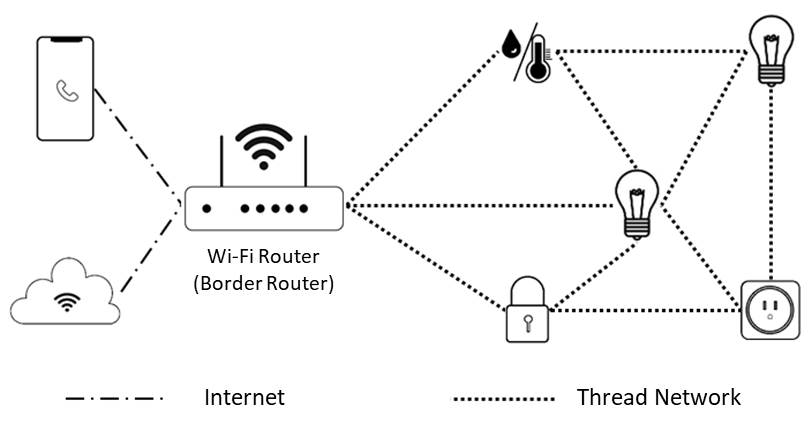
Thread is a newer way for smart devices to communicate. Like Zigbee and Z-Wave, Thread creates a mesh network. It is designed to be very reliable and fast.
Thread works well with many smart home brands and is growing in use. It helps devices talk to each other without using much energy.
What Is a Hub or Bridge?
Sometimes, smart devices need help to talk to each other. This is where a hub or bridge comes in.
A hub is like a translator. It connects devices that use different ways to communicate. For example, a hub can connect Zigbee devices to your Wi-Fi network.
With a hub, all your smart devices can work together, even if they speak different “languages.”
Some smart home systems come with their own hub. Others let you control devices through your phone or smart speaker without a hub.
How Do Smart Devices Share Information?
When smart devices communicate, they send small packets of data. This data can be commands, status updates, or alerts.
For example:
- A smart motion sensor sends a message when it detects movement.
- A smart thermostat sends the current temperature to the app.
- A smart light receives a command to turn on or change color.
Devices use special rules called protocols. Protocols make sure the message is understood correctly. Without protocols, devices might get confused.
Common Protocols Used by Smart Devices
Here are some common communication protocols:
| Protocol | What It Does | Used With |
|---|---|---|
| MQTT | Sends messages quickly and uses little power. | Many smart home apps and devices. |
| HTTP | Used to send data over the internet. | Smart devices connected to Wi-Fi. |
| CoAP | Designed for small devices with limited power. | Zigbee, Thread devices. |
| Zigbee Protocol | Allows Zigbee devices to communicate in a mesh. | Zigbee smart bulbs, sensors. |
| Z-Wave Protocol | Similar to Zigbee but with different technical rules. | Z-Wave locks, lights. |
How Do You Control Smart Devices?
Most people control smart devices using apps on their phones. The app sends commands to the devices through your home network.
You can also use voice commands with smart speakers. For example, you say “Turn off the lights,” and the speaker sends the message to the lights.
Some smart devices can work automatically. For example, a smart light can turn on when it gets dark outside. This is called automation.
What Is the Role of the Internet in Smart Homes?
The internet helps smart devices connect to the cloud. The cloud is a place on the internet where data is stored and processed.
When devices connect to the cloud, they can receive updates and new features. You can also control your devices from anywhere using your phone.
However, not all communication needs the internet. Devices can also talk directly to each other inside your home network.

Credit: www.youtube.com
Are Smart Home Devices Secure When They Communicate?
Security is important. When devices send messages, they use encryption. Encryption scrambles the data so others cannot read it.
Good smart devices follow security rules to protect your home. You should keep your devices updated to stay safe.
Summary
Smart home devices communicate using different wireless technologies like Wi-Fi, Bluetooth, Zigbee, Z-Wave, and Thread. These technologies help devices send messages to each other. Sometimes, a hub helps devices that speak different “languages” connect.
Devices share information using protocols that make sure the messages are clear. You can control smart devices with apps, voice commands, or automation. The internet helps devices connect to the cloud for extra features.
Understanding how these devices talk helps you make your home smarter and safer.
Final Thoughts
Smart homes are getting smarter every day. Knowing how devices communicate can help you choose the right devices. It also helps you use them better. Next time you turn on a smart light with your voice, you will know the magic behind the scenes!
Frequently Asked Questions
How Do Smart Home Devices Connect With Each Other?
Smart home devices connect using wireless signals like Wi-Fi, Bluetooth, or Zigbee. These signals allow devices to talk and work together smoothly.
What Is The Role Of A Smart Home Hub?
A smart home hub acts as a central controller for all devices. It helps devices communicate and work as a team.
Can Smart Devices Work Without Wi-fi?
Some smart devices use Bluetooth or Zigbee to work without Wi-Fi. These options let devices connect directly or through a hub.
Why Do Smart Devices Use Zigbee Or Z-wave?
Zigbee and Z-Wave are low-energy wireless protocols made for smart homes. They help devices communicate reliably with less power use.