
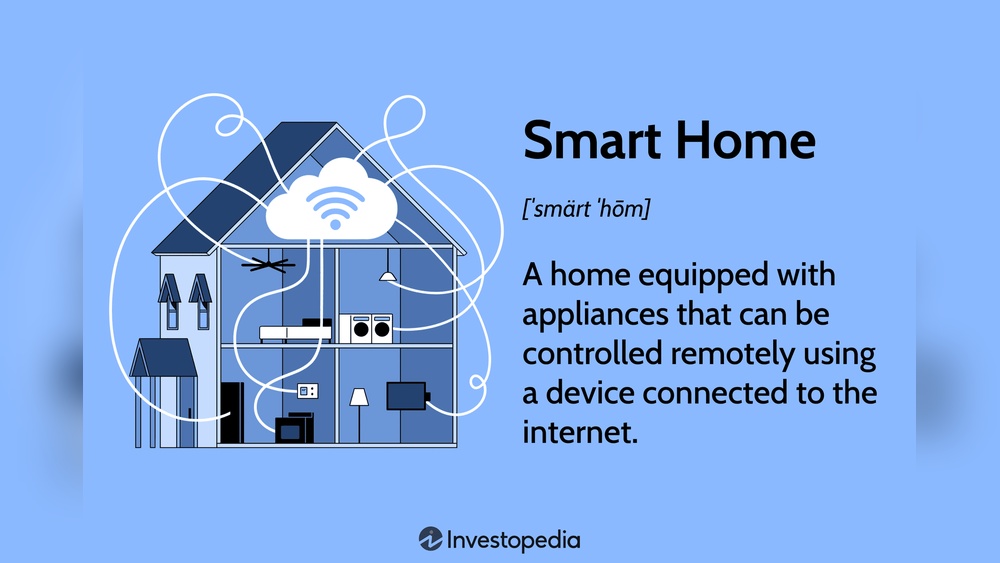
Smart home devices are very popular today. They help make our homes more comfortable and easy to control. But many people face problems when these devices do not work well together. This happens because of compatibility issues. In this article, we will explain what smart home device compatibility means. We will also talk about common problems and how to avoid them.
What Is Smart Home Device Compatibility?
Smart home device compatibility means that two or more devices can work together. For example, a smart light bulb should work with a smart speaker. If they are compatible, you can control the light using your voice through the speaker.
When devices are not compatible, they cannot communicate or work well. This creates problems. You may not be able to control your devices easily. Or some features may not work at all.
Why Do Compatibility Issues Happen?
There are many reasons why smart home devices have compatibility issues. Here are some of the main causes:
- Different Brands: Many smart devices come from different companies. Each company may use its own system or language.
- Different Protocols: Devices use special rules to talk. These rules are called protocols. Some common protocols are Wi-Fi, Bluetooth, Zigbee, and Z-Wave. If devices use different protocols, they may not work together.
- Software Limits: Devices have software inside. Sometimes the software does not support other devices.
- Updates: Devices need updates to work well. If one device updates and another does not, they may stop working together.
- Internet Connection: Some devices need internet to work together. If the internet is slow or lost, devices may not communicate.
Common Compatibility Problems
Let’s look at some common problems people face with smart home devices.
1. Devices Not Connecting
You may try to connect a smart device to your home system. But sometimes, the device does not connect. This can be because the device uses a different protocol or is made by a different brand.
2. Limited Control
Some devices connect but only offer limited control. For example, you might turn a smart bulb on or off but cannot change its color. This happens when the controlling device does not fully support the other device.
3. Delayed Response
Devices may respond slowly. You ask your smart speaker to turn on a light, but it takes many seconds. This can happen because of slow internet or poor communication between devices.
4. Devices Stop Working After Updates
Sometimes, devices stop working well after an update. One device may update its software, but the other does not. This causes compatibility problems.
5. Difficulty Adding New Devices
Adding new smart devices can be hard. Some devices do not appear in the app or system you use. This is often because of protocol or brand differences.
How to Check Device Compatibility
Before buying smart home devices, check if they are compatible. Here are some simple steps:
- Check Supported Protocols: Look at the device box or website. See if it uses Wi-Fi, Bluetooth, Zigbee, or Z-Wave.
- Look for Compatible Brands: Some brands work better with certain systems. For example, Amazon Alexa supports many devices.
- Read Reviews: Other buyers often share if a device works well with others.
- Use Compatibility Lists: Some websites list devices that work well together.
Credit: www.alibaba.com
Popular Smart Home Protocols
Understanding protocols helps you avoid compatibility problems. Here are the main protocols used in smart homes:
| Protocol | How It Works | Common Devices | Range |
|---|---|---|---|
| Wi-Fi | Uses home internet to connect devices. | Smart speakers, cameras, plugs. | Up to 100 feet indoors. |
| Bluetooth | Short-range wireless connection. | Speakers, locks, lights. | About 30 feet. |
| Zigbee | Mesh network; devices connect via others. | Lights, sensors, switches. | Up to 300 feet. |
| Z-Wave | Another mesh network protocol. | Locks, thermostats, sensors. | Up to 100 feet. |
Tips to Avoid Compatibility Problems
Follow these tips to reduce problems with your smart home devices:
- Buy Devices from the Same Brand: This often helps devices work well together.
- Choose Devices Using the Same Protocol: For example, buy all Zigbee devices or all Wi-Fi devices.
- Use a Smart Home Hub: Hubs help different devices connect and talk.
- Keep Devices Updated: Always install the latest software updates.
- Read User Manuals: Manuals often explain compatibility details.
- Test Before Buying: If possible, try devices in store or read many reviews online.
What Is a Smart Home Hub?
A smart home hub is a device that connects many smart devices. It acts like a translator. It helps devices using different protocols talk to each other.
For example, a hub can connect Zigbee lights and Wi-Fi speakers. This way, you can control all devices from one app or voice assistant.
Popular hubs include Amazon Echo Plus, Samsung SmartThings, and Google Nest Hub. Using a hub reduces compatibility problems.
Real-Life Example of Compatibility Issues
Imagine you buy a smart light bulb and a smart speaker. The bulb uses Zigbee, and the speaker uses Wi-Fi only. Without a hub, the speaker may not control the bulb.
If you add a smart home hub that supports both protocols, the problem disappears. The hub helps both devices work together smoothly.
What to Do If You Face Compatibility Issues
If your devices do not work well, try these steps:
- Restart your devices and your internet router.
- Check if all devices have the latest updates.
- Make sure devices are on the same network.
- Reset devices and try to connect again.
- Contact customer support for help.
- Consider adding a smart home hub.

Credit: www.amazon.com
Frequently Asked Questions
What Causes Smart Home Device Compatibility Issues?
Different brands use various software and protocols. This mismatch can block devices from working well together.
How To Check If Devices Are Compatible?
Look for shared protocols like Zigbee or Wi-Fi. Check product details for supported systems and apps.
Can Smart Hubs Solve Compatibility Problems?
Yes, smart hubs connect different devices using multiple protocols. They act as a bridge for better device communication.
Why Do Some Devices Lose Connection With Others?
Devices may use different wireless frequencies or outdated software. This stops them from syncing or responding properly.
Conclusion
Smart home device compatibility is important. It helps your devices work together without problems. Many issues happen because of different brands, protocols, or software.
Before buying, check if devices are compatible. Use the same protocols or buy devices from one brand. A smart home hub can also help connect different devices.
Remember, smart homes should make life easier. Good planning helps avoid many headaches. Take time to learn about compatibility. Then, enjoy a smart home that works well for you.