
Smart home devices are becoming common in many houses. These devices help us control lights, locks, cameras, and more. But how do they work? And what keeps them running well? The answer is firmware and its updates.
What Is Firmware?
Firmware is a special kind of software inside smart devices. It tells the device how to work. You can think of firmware like the brain of the device. It controls all actions and lets the device talk to other gadgets or your phone.
Every smart home device has firmware. From smart bulbs to smart speakers, firmware makes them smart.
How Firmware Works
Firmware sits inside the device’s memory. It is not like apps you install on your phone. Instead, it is built into the device’s hardware. This means the device can start working as soon as you turn it on.
For example, a smart thermostat has firmware that controls the temperature. It reads the room’s heat and adjusts the heater or cooler. All these actions are guided by the firmware.
Credit: www.rambus.com
Why Firmware Updates Are Important
Just like your phone needs updates, smart home devices need them too. Firmware updates fix problems and add new features. They keep your device safe and working well.
- Fix bugs: Sometimes devices have small errors. Updates fix these bugs.
- Improve security: Updates protect devices from hackers.
- Add new features: Updates can give new functions to your device.
- Boost performance: Updates can make devices faster and smoother.
How Do Firmware Updates Happen?
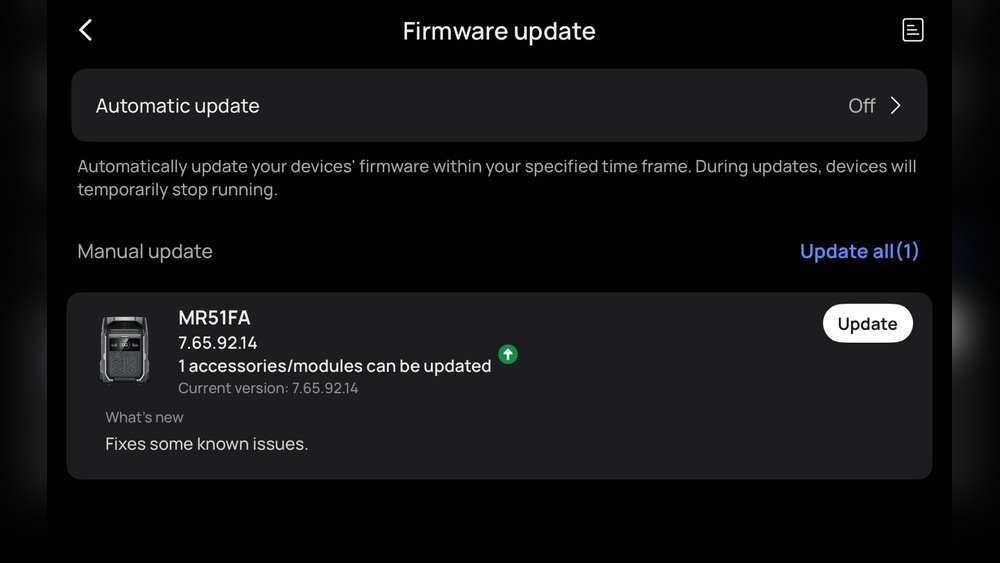
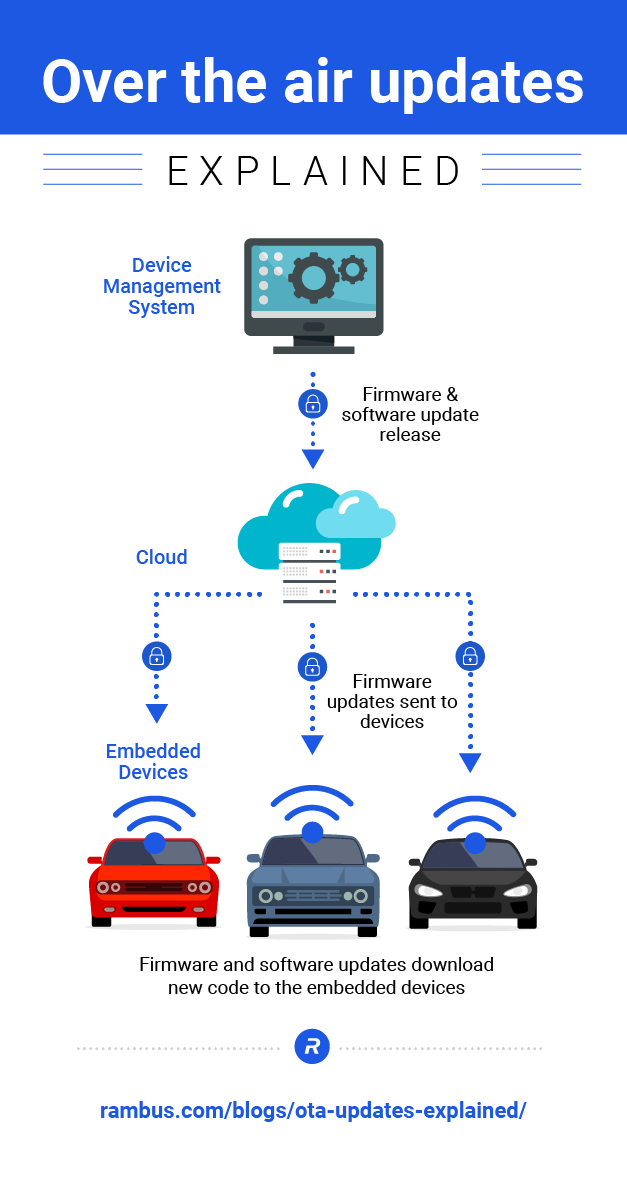
Most smart home devices connect to the internet. When a new update is ready, the device downloads it automatically. Sometimes, you might see a message asking to update the device. Then you can start the update.
Updates usually happen in the background. This means you can keep using the device while it updates. But some updates may need the device to restart.
Types of Firmware Updates
Firmware updates come in different types. Here are the most common:
| Update Type | Purpose | Example |
|---|---|---|
| Bug Fixes | Fix small problems in the device | Fixing a light bulb that turns off unexpectedly |
| Security Updates | Protect devices from hackers | Stopping hackers from accessing your smart lock |
| Feature Additions | Add new functions or tools | Adding voice control to a smart speaker |
| Performance Improvements | Make devices faster or use less power | Making a camera start faster |
How To Check For Firmware Updates
It is good to check for updates now and then. Here’s how you can do it:
- Open the device’s app on your phone.
- Find the settings or device section.
- Look for “Firmware Update” or “Software Update.”
- If an update is available, follow the steps to install it.
Some devices update automatically. But checking helps you stay safe and updated.
Credit: www.alibaba.com
What Happens If You Don’t Update Firmware?
If you ignore updates, your device may have problems. It could:
- Stop working properly.
- Have security risks.
- Miss new features.
- Run slower than it should.
So, updates keep your smart home devices healthy and safe.
Can Firmware Updates Cause Problems?
Sometimes, updates may cause issues. For example, if the update is interrupted, the device might not work. Or new bugs may appear.
This is rare. Most updates are tested before release. To avoid problems:
- Make sure your internet is stable during updates.
- Do not turn off the device while updating.
- Follow the device maker’s instructions carefully.
How Firmware Updates Affect Your Privacy
Smart home devices collect data to work better. Firmware updates help protect this data. They fix security holes that hackers can use.
Always update your devices to keep your home and information safe.
Summary: Why Firmware And Updates Matter
Firmware is the hidden software inside smart devices. It controls how devices work. Updates fix bugs, add features, and improve security.
Checking and installing updates is important. It keeps your smart home devices safe and working well. Without updates, devices may stop working or become unsafe.
Remember to:
- Check for updates regularly.
- Follow update instructions carefully.
- Keep your devices connected to the internet.
Smart home technology is useful. Firmware and updates make it reliable. With a little care, your devices will serve you well for a long time.
Frequently Asked Questions
What Is Firmware In Smart Home Devices?
Firmware is software programmed inside smart devices. It controls how devices work and respond to commands.
Why Do Smart Home Devices Need Firmware Updates?
Updates fix bugs, improve security, and add new features. They keep devices running smoothly and safely.
How Often Should I Update My Smart Device Firmware?
Check for updates monthly or when the device alerts you. Regular updates help maintain good device performance.
Can Firmware Updates Improve Smart Device Security?
Yes, updates patch security holes. This protects your smart home from hackers and cyber threats.