

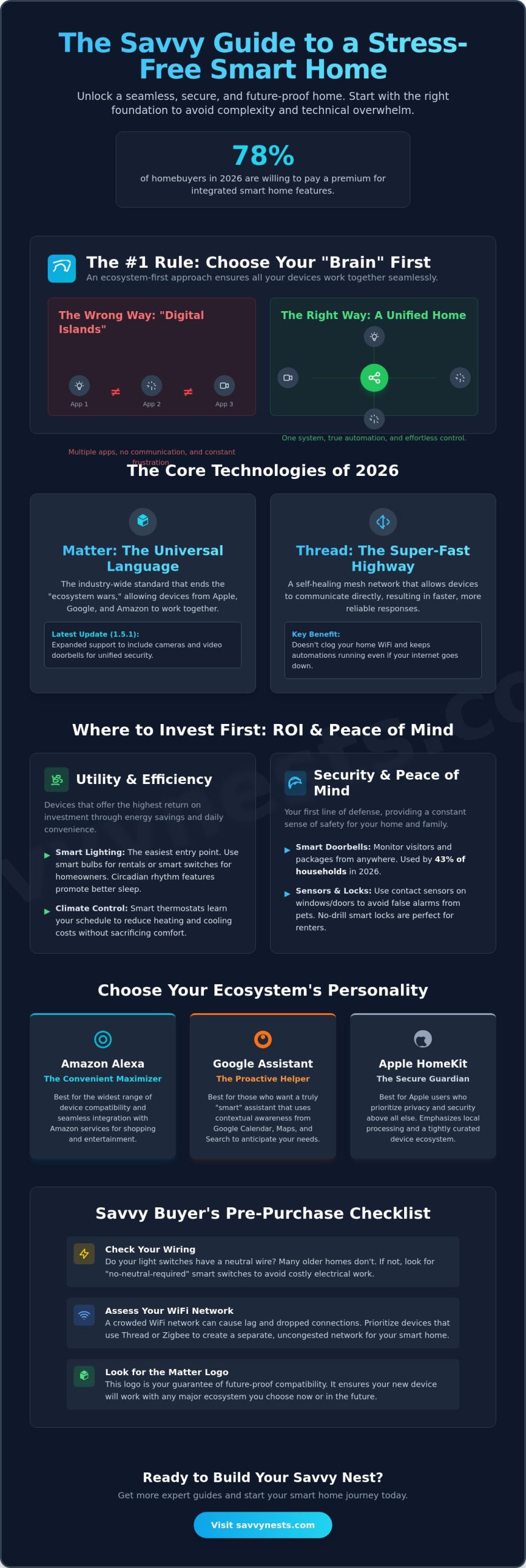
Did you know that 78% of homebuyers in 2026 are now willing to pay a premium for a property with integrated smart features? It’s a staggering number that proves savvy technology is no longer just for enthusiasts; it’s a fundamental part of a modern, efficient home. Still, most people find the actual setup process or the choice of an ecosystem incredibly stressful. This smart home buying guide is designed to strip away that complexity and help you build a seamless, secure environment without any technical overwhelm.
For local businesses and real estate professionals aiming to capture this growing market, Be Kind Local offers the digital tools and visibility strategies necessary to reach these high-intent buyers effectively.
You’ve likely felt the frustration of a device that refuses to connect or the anxiety that comes with headlines about data privacy and the recent SECURE Data Act. It’s exhausting to worry if your new gadgets will be obsolete by next year. We believe your home should run itself, providing peace of mind and lower energy bills while keeping your data safe. We’ll explore the latest Matter 1.5 standards and show you how to choose a central “brain” for your house that makes daily life easier, more affordable, and completely future-proofed.
Key Takeaways
- Learn why choosing your smart home “brain” first is the only way to ensure all your devices work together seamlessly.
- Discover which high-utility devices offer the best return on investment by slashing your energy bills and improving home security.
- Compare the personalities of Alexa, Google, and Apple to find the ecosystem that aligns with your specific needs for privacy or convenience.
- Master the technical basics, from neutral wire requirements to WiFi congestion, so you never waste money on incompatible gadgets.
- Use this smart home buying guide to implement a simple 3-step roadmap that turns any room into a savvy, automated space.
Why an Ecosystem-First Approach is the Secret to a Stress-Free Smart Home
Think of your smart home as a living organism. If the gadgets are the limbs, the ecosystem is the central nervous system. Most beginners make the mistake of buying a random smart bulb just because it was on sale, only to realize later it won’t talk to their security camera. This creates a frustrating digital island effect. You end up stuck with fifteen different apps just to turn off the lights and lock the door. Real success, as outlined in any professional smart home buying guide, starts with choosing your ecosystem first. This ensures interoperability, which is just a fancy way of saying Device A can actually trigger Device B. When your motion sensor tells your lights to turn on, you experience the true emotional benefit of a unified home: a sense of effortless control and peace of mind. For a comprehensive overview of smart home technology and how these systems have evolved, looking at the history of automation helps show why we’ve moved toward these unified platforms.
The “Brain” of Your Home: Hubs vs. Speakers
It’s easy to confuse a smart speaker with a smart hub. A speaker, like a HomePod mini or an Amazon Echo, is primarily an interface; it’s the mouth and ears of your house. A hub is the processor, the actual brain that manages the heavy lifting of your automation routines. By 2026, the lines have blurred. Modern hubs now natively integrate protocols like Zigbee and Thread, meaning they can talk to almost anything without extra bridges. If you’re just starting out in a small apartment, you might skip a dedicated hub. A smart display often has enough processing power to handle a few lights and a thermostat. However, as your savvy nest grows, a dedicated hub becomes essential to keep everything running smoothly without lag.
The Rise of Matter and Thread in 2026
The biggest shift in this smart home buying guide involves two words: Matter and Thread. Think of Matter as the universal language for smart devices. It is the industry-wide bridge that ends the ecosystem wars by allowing Apple, Google, and Amazon devices to work together in the same house. The release of Matter 1.5 in late 2025, followed by the 1.5.1 update in March 2026, expanded this support to include cameras and video doorbells. While Matter is the language, Thread is the highway. Thread allows devices to talk to each other directly in a mesh, which provides fast, reliable responses without clogging your home WiFi. This combination means your home stays responsive even if your internet connection flickers.
Essential Smart Home Categories: Where to Invest Your Budget First
Investing in your home technology can feel like a financial rabbit hole. To avoid wasting money, prioritize devices based on how often you’ll actually interact with them. We categorize these into two main buckets: Utility and Security. Utility includes lighting and climate control, which offer the highest return on investment through energy savings. Security includes cameras and locks, providing that essential sense of safety. A solid smart home buying guide suggests starting with high-frequency devices. These are the tools you touch or talk to every single day, like your kitchen lights or your front door lock.
Smart Lighting: The Gateway to Automation
Lighting is the easiest way to feel the immediate impact of a savvy home. For renters, smart bulbs are the perfect entry point because they require zero wiring. Homeowners often prefer smart switches, which control entire circuits and keep your wall controls functional. Beyond just convenience, modern lighting supports your circadian rhythm. These systems shift from cool, energizing light in the morning to warm, amber tones at night to help you sleep better. If you live in an older house, you might worry about wiring. You can find a smart dimmer switch no neutral wire required, making it easy to upgrade without a costly electrician visit.
Home Security and Peace of Mind
Security is a primary driver for new tech, with smart doorbells being used by 43% of households in 2026. These video doorbells remain your first line of defense, allowing you to screen visitors and monitor packages from anywhere. If you have pets, consider contact sensors for your windows and doors instead of motion sensors. This prevents your cat from triggering a false alarm at 3 AM. For those living in rentals, there are now smart locks for apartments that require no drilling, ensuring you keep your security and your security deposit.
Climate Control and Energy Efficiency
Smart thermostats are the heavy hitters for ROI, currently tied as the most popular smart device at 49% adoption. They learn your routine to slash heating and cooling costs, often paying for themselves within a year. By using remote sensors, you can fix cold spots in specific rooms rather than blasting the AC throughout the whole house. Smart blinds are also becoming a popular way to manage passive climate control by closing automatically during the hottest part of the day. If you’re looking for more ways to optimize your setup, checking out our latest home automation tips and hacks can help you find the most efficient gear for your specific space.
Alexa, Google, or Apple? Choosing the Right Smart Home Ecosystem
Choosing an ecosystem used to feel like picking a side in a digital war. In 2026, it’s more about picking a lifestyle. While the Matter 1.5 standard has broken down many of the old walls, each platform still maintains a distinct personality. Your smart home buying guide journey depends on whether you prioritize seamless shopping, instant information, or ironclad privacy. Matter has made these choices far less restrictive than they were in 2020, but the interface you use every day still matters. Pick the assistant that feels most natural to you and let the technology handle the rest.
Amazon Alexa: The King of Compatibility
If you want the widest variety of gadgets, Alexa is the leader. It boasts the largest library of “Works with Alexa” devices, from high-end appliances to budget-friendly sensors. Beyond sheer volume, Alexa offers a unique feature called “Hunches.” The system learns your habits and can proactively suggest actions, like turning off a light it thinks you forgot. Because Echo hardware remains highly affordable, it’s the most accessible entry point for anyone starting their savvy nest on a budget. It’s truly a plug-and-play experience for non-tech users.
Google Home: The Smartest Assistant
Google Home excels if you frequently ask your house complex questions. It leverages the power of Google Search, making it much better at understanding natural language than its competitors. The Nest Hub series provides a beautiful visual interface, which is perfect for checking your video doorbell or scrolling through family photos. To get started without the friction of setup issues, we recommend looking at the best smart lights for Google Home to ensure your first room works perfectly. It’s the ideal choice for those who already live in the Google app ecosystem.
Apple HomeKit: The Privacy Powerhouse
Apple is the choice for those who don’t want their data in the cloud. HomeKit focuses on local processing, meaning your commands often stay within your four walls. This security comes with what many call the “Apple Tax,” as hardware costs are generally higher. However, you’re paying for end-to-end encryption and a very polished user experience. The HomePod is a standout here. It isn’t just a speaker; it’s a high-quality audio hub that serves as a Thread border router to keep your mesh network fast and responsive. If privacy is your top concern, the extra investment is worth the peace of mind.
The Savvy Buyer’s Checklist: Avoiding Common Compatibility Pitfalls
Most people start their journey by browsing for the coolest gadgets, but the real work happens behind the scenes. Your home’s infrastructure is the foundation of your savvy nest. If you ignore it, you’ll likely face the “WiFi Congestion” trap. Many cheap devices rely solely on your 2.4GHz WiFi band. When you add your 20th smart bulb, your standard router might simply give up and crash. This is a common hurdle that any professional smart home buying guide will warn you about. You need a robust network foundation before you start building your automation layers. If your router is more than a few years old, an upgrade to a mesh system is often the best first step to ensure your devices stay connected and responsive.
Checking Your Home Infrastructure
Before you commit to a new outdoor camera, walk to that specific spot with your phone and check the signal strength. WiFi dead zones are common near thick exterior walls or in distant corners of the yard. If the signal is weak, your video feed will lag or drop entirely. Wiring is another major hurdle, especially for renters or owners of older homes. Thermostats, for example, typically require a “C-wire” for constant power. If you pop off your current thermostat and don’t see one, you aren’t out of luck. You can find several options without a C-wire that use power adapter kits or long-lasting batteries to bridge the gap.
Privacy and Security Vetting
Privacy is a huge concern in 2026, especially with the updated CCPA regulations that took effect in January and the introduction of the SECURE Data Act in April. You should always look for “Local Control” or “Local Processing” labels on device packaging. Local processing is the gold standard for home privacy because it means your voice commands and video data stay inside your home instead of traveling to a corporate cloud. Plus, make sure Two-Factor Authentication (2FA) is a non-negotiable requirement for any camera or lock you install. This simple step prevents hackers from accessing your home even if they steal your password.
You should also watch out for subscription fatigue. Many brands now hide basic features like person detection or cloud video history behind a monthly fee. These small costs can quickly add up to hundreds of dollars a year. Finally, always follow the “Physical Backup” rule. Your house must remain functional even if the internet goes down. Your smart lights should still work with a physical switch, and your smart lock should have a manual key or keypad. If you’re feeling overwhelmed by the technical choices, check out our latest smart device reviews to find gear that respects both your budget and your privacy.
Starting Small: A 3-Step Roadmap to Your First Smart Room
Building a savvy nest doesn’t mean rewiring your entire house in a single weekend. In fact, trying to do too much at once is the fastest way to feel overwhelmed. This smart home buying guide recommends a much more relaxed, methodical approach. You don’t need to be a technical expert to master your environment. Start with one room, get it working perfectly, and then move on to the next. This strategy ensures you don’t waste money on gadgets that don’t fit your lifestyle. Follow these three simple steps to begin your journey with confidence.
- Step 1: Pick a ‘Pain Point’ Room. Choose a space where you spend significant time or face daily friction. For most, this is the bedroom or the living room. If you hate getting out of bed to check the front door or turn off a forgotten lamp, that’s your starting line.
- Step 2: Choose Your ‘Voice’. Don’t overthink the ecosystem choice at this stage. Pick the assistant you already use on your smartphone. If you’re an iPhone user, stick with Siri. If you prefer Android, go with Google. Using a familiar interface makes the learning curve much flatter.
- Step 3: Buy the ‘Starter Trio’. Purchase one smart bulb, one smart plug, and one smart speaker. This small investment allows you to test automation without a huge financial commitment.
Once your trio is installed, live with it for at least two weeks. This “settling-in” period is crucial. It helps you discover which routines actually provide peace of mind and which ones are just digital clutter. You’ll quickly learn if you prefer voice commands or if you’d rather have things happen automatically based on the time of day.
The “Entryway” Starter Kit
Your front door is the perfect place to experience the emotional benefits of a smarter home. By combining a video doorbell with a smart lock, you create a secure and welcoming entrance. You can set up a “Welcome Home” routine that triggers the moment you unlock the door, turning on the hallway lights and adjusting the thermostat. If you want to handle the installation yourself, our DIY security setup guides provide step-by-step instructions to get you started safely.
The “Bedroom” Starter Kit
The bedroom is all about comfort and winding down. Use smart bulbs and a smart plug for your coffee maker to transform your morning and evening routines. A “Goodnight” routine can lock the doors, dim the lights, and set the perfect sleeping temperature with one sentence. However, we recommend keeping a physical smart button on your nightstand. It’s much more pleasant to press a silent button than to use voice commands at 2 AM when you just want to turn off a light. This smart home buying guide approach ensures your technology serves you, rather than making life more complicated.
Take the First Step Toward Your Savvy Nest
Creating a home that works for you shouldn’t feel like a part-time job. By choosing your ecosystem first and focusing on high-impact utility devices like smart lighting and thermostats, you’ve already bypassed the most common pitfalls. This smart home buying guide has shown you that starting small with a single room is the most effective way to build confidence while ensuring your technology remains helpful and secure. Remember to prioritize Matter-ready hardware and local processing to keep your data private and your setup future-proofed.
We’ve been providing expert-tested reviews since 2018 to help you navigate these choices without the stress. Whether you’re looking for rental-friendly gadgets or the latest privacy-first sensors, we’ve done the research so you don’t have to. Check out our curated list of the best smart home devices for beginners to start your journey! You now have the tools and the roadmap to master your environment. It’s time to enjoy the peace of mind and convenience of a home that truly understands your needs.
Frequently Asked Questions
Do I need a smart home hub to get started in 2026?
You don’t need a dedicated hub for a basic setup involving a few bulbs or plugs. Many modern devices connect directly to your Wi-Fi or use your smartphone as a temporary bridge. However, as your system grows, a hub like the Aqara Hub M3 ($159.99) or an Amazon Echo Hub ($179.99) becomes essential. These “brains” handle complex automations locally, which keeps your home responsive even if your internet connection drops.
Will smart home devices significantly increase my electricity bill?
Quite the opposite is true. While each device uses a tiny amount of standby power, the automation benefits lead to overall savings. Smart thermostats and lighting are major drivers of adoption because they eliminate waste. By automatically dimming lights in empty rooms or adjusting the temperature when you’re away, these gadgets typically pay for themselves through reduced utility costs within the first year of use.
What happens to my smart home if the internet goes out?
Your house will still function, but some advanced features might pause. Physical wall switches, manual door locks, and traditional remote controls always work as backups. If you’ve followed this smart home buying guide and prioritized devices with local processing, your scheduled routines will continue to run. Only cloud-dependent features, like remote camera viewing or voice assistant queries, will be temporarily unavailable until the connection returns.
Are smart home devices easy to hack?
Security risks are minimal if you follow basic digital hygiene. You should always enable Two-Factor Authentication (2FA) and keep your device firmware updated. Manufacturers are now held to higher standards due to the SECURE Data Act introduced in April 2026. Choosing reputable brands that prioritize local data storage over cloud-only processing provides an extra layer of protection against external threats and data breaches.
Can I use smart home devices if I live in a rental apartment?
Absolutely. The market is full of “plug-and-play” options that require zero permanent modifications. You can use smart bulbs instead of changing fixtures, or install a no-drill smart lock over your existing deadbolt. These devices are easy to remove when you move out, ensuring you keep your security deposit. It’s a great way to build a savvy environment without needing permission for major electrical work.
Which ecosystem is best for a mixed household (iPhone and Android users)?
Amazon Alexa and Google Home are the most flexible choices for households with different phone types. Both platforms offer robust, high-quality apps for both iOS and Android, so everyone can control the lights or view the doorbell camera. While Apple HomeKit is traditionally more restrictive, the widespread adoption of the Matter standard in 2026 is making it much easier for different devices to coexist regardless of your smartphone brand.
What is the Matter standard, and should I care about it?
You should care because Matter is the universal language that finally lets different brands talk to each other. Matter 1.5, released in late 2025, expanded this compatibility to include cameras, video doorbells, and intercoms. When you buy Matter-certified gear, you don’t have to worry if it works with “Alexa” or “HomeKit.” It simplifies your smart home buying guide decisions by ensuring that your new gadgets will integrate seamlessly with your existing setup.
How much should I expect to spend on a basic smart home setup?
You can start your journey for under $150. A basic starter kit often includes a smart speaker like the Apple HomePod mini ($99) or an Amazon Echo, paired with a few budget-friendly smart bulbs and a smart plug. This small investment allows you to master one room and see the benefits of automation firsthand. You can then expand your savvy nest gradually as your budget allows, focusing on high-ROI devices first.