
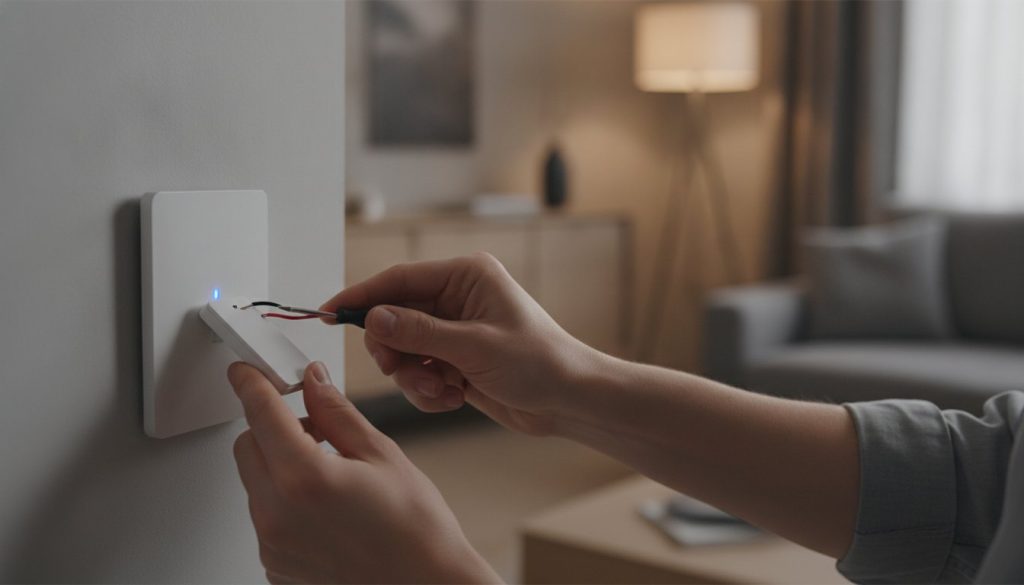
That missing white wire in your wall box shouldn’t be the end of your smart home ambitions. If you live in a house built before the 1980s, you’ve likely felt the sting of opening a switch plate only to find two wires where you expected three. It’s easy to feel overwhelmed by confusing wiring colors or the fear that a DIY upgrade might lead to flickering LEDs or even an electrical fire. You want the convenience of voice control and automated mood lighting, but you don’t want to pay thousands for a professional rewiring job.
We agree that technology should serve you, not create more work. This guide promises to help you find a smart dimmer switch no neutral wire that actually delivers a flicker-free experience with your existing setup. We’ll break down the best solutions for 2026, comparing the legendary reliability of the Lutron Caseta against newer, future-proof options like the Inovelli Blue Series. You’ll learn how to achieve a seamless, professional-grade lighting upgrade that works perfectly with Alexa or Google Home, all while keeping your original wiring intact and your budget under control.
Key Takeaways
- Discover why homes built before the mid-1980s often lack a return path for electricity and how you can still achieve a modern lighting setup.
- Learn how a smart dimmer switch no neutral wire uses “power leakage” technology to stay connected without needing a dedicated neutral line.
- Identify the critical features to look for, from voice assistant compatibility to physical control styles that match your home’s aesthetic.
- Master the safety essentials of DIY installation, including how to properly label your wiring and verify power is off before you begin.
- Get our savvy 2026 recommendations for the most reliable switches on the market, including top-rated options from Lutron and GE.
Understanding the No-Neutral Challenge in Older Homes
Opening a wall box only to find two black wires is a common frustration for owners of older homes. Most modern smart devices expect a neutral wire, which serves as the return path for electricity to the panel. Think of it like a two-way street. Power comes in through the “hot” wire and needs a clear route back to complete the circuit. When that return path is missing at the switch, the circuit remains incomplete for any device trying to draw power at that specific point.
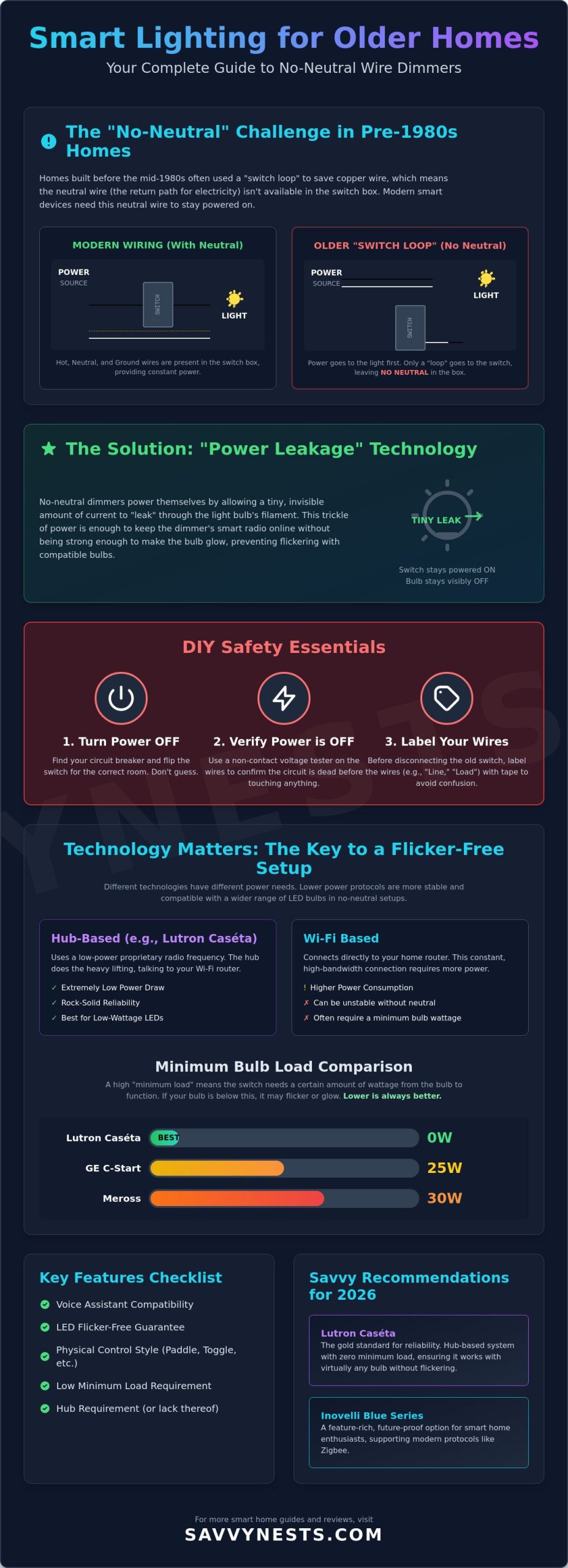
Before the mid-1980s, electrical codes didn’t require a neutral wire at every switch box. Electricians often used a “switch loop” to save money on copper wiring. In this setup, power goes directly to the light fixture first. Only a single loop of wire runs down to the wall switch to break or complete the connection. This leaves the switch box without a constant return path, which is why your old “dumb” switch worked fine, but a modern upgrade feels impossible.
Safety First: Before you even loosen a screw on that wall plate, head to your circuit breaker. Turn off the power to the room and verify the circuit is dead. Electrical work is safe and rewarding, but only when you respect the power behind the walls. Never assume a switch is safe just because the lights are off.
How to Identify Your Wiring Without an Electrician
You don’t need a professional degree to figure out what’s happening in your wall. Once the power is off, pull the switch out slightly and count the wires entering the box. A smart dimmer switch no neutral wire setup is usually confirmed if you only see two insulated wires, which are typically black, and perhaps a bare copper ground wire. While many online forums suggest simply looking for a white wire, you shouldn’t trust color alone. In older DIY-modified homes, a white wire might actually be used as a “hot” wire. Always use a non-contact voltage tester to ensure no current is flowing before you touch any metal components.
Why Traditional Smart Dimmers Fail Without a Neutral
Standard smart switches are essentially tiny computers. They have internal radios and processors that must stay “awake” to hear your voice commands from Alexa or Google Home. To stay powered, they need a complete, closed circuit. A traditional switch simply cuts the connection to turn the light off. When that happens, a standard smart switch loses its own power source and goes offline. This is where modern electronic switch technology comes into play. It allows specialized dimmers to “leak” a tiny, invisible amount of power through the bulb to keep the internal computer running without actually lighting up the room. Without this specific design, a standard smart switch simply won’t work in a box missing a neutral wire.
How No-Neutral Smart Dimmer Technology Actually Works
The magic behind a smart dimmer switch no neutral wire lies in a clever engineering trick called power leakage. Since the switch doesn’t have a dedicated return path for electricity, it stays powered by pulling a tiny amount of current through the light fixture itself, even when the lights are technically off. It’s a bit like keeping a faucet dripping just enough to keep a water wheel turning without filling the sink.
This method works flawlessly with old-school incandescent bulbs. Their thick filaments need a significant amount of energy to glow, so the minuscule current required to keep the switch’s radio alive isn’t enough to create visible light. Modern LEDs are a different story. Because they’re incredibly efficient, that same tiny leak of power can cause them to flicker, pulse, or stay dimly lit when they should be dark. This is why matching your switch to your bulb type is the most important step in your upgrade.
Power-Thru-Bulb vs. Hub-Based Protocols
Choosing the right communication protocol is essential for a stable, flicker-free setup. Wi-Fi switches are often the most power-hungry because they maintain a direct, high-bandwidth connection to your router. This high demand can make them unstable in a no-neutral configuration. In contrast, systems like Lutron Caséta use a proprietary low-power frequency. This efficiency allows the Lutron Caséta to achieve a zero-watt minimum load, meaning it works with almost any bulb without issues. Other budget-friendly options have stricter requirements. For example, the C by GE smart switch requires a 25W minimum load, while the Meross model requires 30W. If you’re planning to use a single low-wattage LED bulb, these requirements matter. You can find more details on these specifications in our smart device reviews to ensure your hardware matches your home’s needs.
Preventing the Ghosting Effect
Have you ever turned your lights off only to see them still glowing at a faint, eerie 5% brightness? This is known as ghosting. Ghosting is a result of current leakage exceeding the LED threshold, where the power meant for the switch is captured by the sensitive LED driver. To fix this, many manufacturers include a bypass module or a load resistor. This small device is installed at the light fixture rather than the switch box. It acts as a shunt, safely diverting the excess current away from the bulb.
- The bypass module soaks up the extra energy that causes flickering.
- It stabilizes the electrical load for ultra-low-wattage LED setups.
- It ensures your “off” command actually results in total darkness.
Using a bypass is often the only way to get budget-friendly no-neutral switches to play nice with modern lighting. It adds a small step to your installation, but the reward is a rock-solid smart home experience without the frustration of ghosting lights.
Key Features to Look for in a No-Neutral Smart Dimmer
Finding the right smart dimmer switch no neutral wire means looking past the sleek design to ensure it actually works with your home’s unique personality. It’s not just about turning lights on and off with your phone. You want a device that feels natural to use and integrates seamlessly with the voice assistants you already rely on, like Alexa, Google Home, or Apple HomeKit. If you’re an Apple enthusiast, you’ll find that options like the Lutron Caséta or the budget-friendly Meross are standout choices for their native HomeKit support.
Don’t overlook the importance of physical design. Some users prefer the tactile, familiar click of a traditional paddle switch, while others enjoy the modern aesthetic of a touch-sensitive glass panel. Beyond looks, check for a feature called “Low-End Trim.” This setting is a lifesaver for older homes. It allows you to manually set the lowest brightness level the switch will reach. By stopping the dimming just before the bulb starts to pulse, you can enjoy a flicker-free experience even with sensitive LED bulbs.
Bulb Compatibility: The Hidden Cost
One of the biggest traps for beginners is assuming any “dimmable LED” will work. Because no-neutral switches rely on that tiny power draw we discussed earlier, they have a “Minimum Load” requirement. If your bulb doesn’t pull enough power, the switch might reboot or the light might flicker. For example, the C by GE smart switch usually requires a 25W minimum load, and Meross requires 30W. If you’re only dimming a single 8W LED bulb, you’ll run into trouble. The Lutron Caséta is the gold standard here, as it’s compatible with over 3,000 models of bulbs and features a zero-watt minimum load, making it the most reliable choice for low-power setups.
Protocol Selection: Wi-Fi vs. Zigbee vs. Clear Connect
How your switch talks to the internet matters just as much as how it talks to your bulbs. Wi-Fi switches are popular because they’re easy to set up and don’t require an extra bridge. However, they’re often the most power-hungry, which can be a risky combo for no-neutral wiring. If you want maximum stability, look toward proprietary protocols like Lutron’s Clear Connect. It uses a dedicated frequency that doesn’t compete with your Netflix streaming or Zoom calls. For those who want to future-proof their home, the Inovelli Blue Series 2-1 is a savvy pick. It supports Matter over Thread, a new universal standard that ensures your devices will stay compatible with new tech for years to come.
Step-by-Step Installation and Setup for Beginners
Ready to transform your home? Installing a smart dimmer switch no neutral wire is a manageable DIY project that usually takes about 30 minutes. First, head to your main service panel and flip the breaker. Don’t rely on the light switch being in the “off” position; it’s not a guarantee of safety. Use a non-contact voltage tester to verify there is zero current in the box. Safety isn’t just a suggestion; it’s the foundation of a successful upgrade. Once you’ve confirmed it’s safe, unscrew the old switch and pull it forward from the wall.
You’ll typically find two main wires connected to the switch. One is the “Line” wire, which brings power from the panel, and the other is the “Load” wire, which sends power to the light fixture. If they aren’t clearly labeled, you may need to briefly restore power and use a tester to see which one is hot, then turn the breaker back off immediately. Label these wires with tape so you don’t mix them up. Connect the wires to the terminals on your new smart dimmer. Most no-neutral switches are sensitive to the Line and Load positions, so double-check your manual before tightening the wire nuts. If your home has a bare copper ground wire, connect that to the green screw on the switch for essential protection.
Carefully fold the wires back into the box. This can be a tight fit in older homes with shallow electrical boxes, so take your time to avoid pinching any insulation. Secure the switch with the mounting screws and snap on the faceplate. Head back to the breaker, restore power, and look for the indicator light on the switch to confirm it’s receiving power. If you need help troubleshooting a specific device, our home automation tips and hacks offer more detailed walkthroughs for tricky setups.
Installing the Bypass Capacitor (When Needed)
If your LED bulbs flicker or glow when the switch is off, you likely need a bypass capacitor. Unlike the switch itself, this small module installs at the light fixture’s junction box, not the wall switch box. You’ll wire it in parallel across the Neutral and Load lines. Once connected, simply tuck the capacitor safely inside the fixture canopy. This small addition ensures your smart dimmer switch no neutral wire stays stable by providing a path for that tiny “leakage” current that otherwise causes sensitive LEDs to pulse.
Software Calibration: Setting the Trim
The final step happens on your phone. After pairing the device with your Wi-Fi or hub, look for the “Trim” settings in the app. Many LEDs struggle to stay lit below 10% or 15% brightness. By setting a minimum dim threshold, you prevent the strobe effect that happens when the power drops too low. This software calibration is the secret to a professional-feeling install. Test the response speed with voice commands to Alexa or Google Home to ensure everything is synced perfectly before you call the job finished.
Savvy Recommendations: The Best No-Neutral Dimmers for 2026
Selecting the right smart dimmer switch no neutral wire comes down to balancing your existing smart home ecosystem with your specific lighting needs. While many options exist, a few standout performers have proven their reliability in older electrical boxes. Whether you prioritize a budget-friendly setup or a professional-grade system that never fails, these 2026 recommendations will help you upgrade with confidence.
For those who want the absolute gold standard, the Lutron Caséta Wireless remains the top choice. It currently retails between $60 and $65; it is a premium investment that pays off in stability. If you prefer a simpler, hubless setup, the GE Cync (formerly C by GE) is available for approximately $35. It connects directly via Wi-Fi or Bluetooth, making it an excellent entry point for beginners. Alexa users often gravitate toward the Leviton Decora Smart No-Neutral Dimmer, priced at $45, because it maintains a traditional look while offering modern voice control. For international users or those with shallow European-style boxes, Schneider Electric and Shelly provide compact modules that fit behind your existing “dumb” switches.
Lutron Caséta: Why It Remains the Pro Choice
Lutron Caséta stays at the top of our list because it uses a proprietary Clear Connect frequency of 434MHz. Unlike Wi-Fi switches that compete for bandwidth with your phone and TV, this dedicated frequency penetrates walls easily and avoids interference. It is also the most compatible option on the market, verified to work with over 3,000 different LED and CFL bulbs. One of its most savvy features is the Pico Remote. This tiny wireless remote allows you to add a second “3-way” switch anywhere on your wall without pulling a single new wire. While it requires a separate bridge, the peace of mind and flicker-free performance make it the least likely to cause technical headaches.
Making the Savvy Choice for Your Home
Before you buy, compare these top contenders to see which fits your home’s technical requirements and your personal budget. Remember to check the minimum load requirements we discussed earlier; a switch like the Meross ($25) is great for the budget-conscious but requires at least a 30W load to stay stable.
| Model | Hub Required? | Protocol | Min. Load |
|---|---|---|---|
| Lutron Caséta | Yes (Bridge) | Clear Connect | 0 Watts |
| Inovelli Blue | Optional | Matter / Thread | Low |
| GE Cync | No | Wi-Fi / BT | 25 Watts |
| Meross Smart | No | Wi-Fi | 30 Watts |
Your final decision should align with the devices you already use. If you are deeply invested in Apple HomeKit, Lutron or Meross are your best bets. If you want a future-proof home, the Inovelli Blue Series 2-1 ($50) is a savvy choice because it supports the new Matter over Thread standard. No matter which you choose, you are now equipped to bring modern convenience to your older home without the stress of an expensive rewiring project. Find the perfect smart dimmer for your rental or older home at SavvyNests.com and start your upgrade today.
Bring Modern Lighting to Your Classic Home
You’ve seen that a lack of a neutral wire isn’t a barrier to a modern, automated home. By understanding how power leakage works and choosing a smart dimmer switch no neutral wire that matches your bulb’s load, you’ve bypassed the need for expensive rewiring. We’ve covered how the right protocol, like Lutron’s Clear Connect or the new Matter standard, can eliminate the frustration of flickering lights. You’ve also learned that a simple software trim adjustment or a bypass capacitor can solve the most common ghosting issues.
It’s time to take control of your environment. Whether you’re a homeowner looking for a permanent upgrade or a renter needing a non-destructive solution, the right gear makes all the difference. Check out our curated list of the best no-neutral smart home gear. Our recommendations are expert-tested for ghosting and flickering; they include rental-friendly “no-trace” installation tips and are fully compatible with Alexa, Google Home, and Apple HomeKit. You have the knowledge to master your space; now go out and make your home a little smarter.
Frequently Asked Questions
Do I really need a neutral wire for all smart switches?
No, you don’t need a neutral wire for every setup. Many manufacturers now offer a specialized smart dimmer switch no neutral wire solution designed specifically for homes built before the 1980s. These switches use a small amount of current from the hot wire to stay connected to your network. This clever design bypasses the need for a dedicated return path while keeping your smart features active.
Why do my LED lights flicker when I use a no-neutral smart dimmer?
LEDs flicker because they’re highly sensitive to the tiny amount of power the switch uses to stay online. If your bulb’s wattage is too low, it can’t absorb this leakage current, which leads to a strobe effect. This is common when the total load is below 25 watts. Upgrading to a higher quality bulb or adding a bypass module usually fixes this issue instantly.
What is a bypass capacitor and do I need one for my smart switch?
A bypass capacitor is a small device that acts as a secondary path for electricity. It soaks up the extra power that would otherwise cause your LED bulbs to flicker or glow when they’re turned off. You’ll only need one if your specific bulb and switch combination shows signs of electrical instability. Most budget friendly no-neutral switches include one in the box for this reason.
Can I use a no-neutral smart dimmer in a 3-way switch configuration?
Yes, you can, but the setup is a bit different than a traditional 3-way circuit. Most no-neutral systems use a wireless remote at the second location instead of complex traveler wiring. This approach is much easier to install in older homes. It avoids the confusion of identifying wires in a crowded box while still giving you control from two different walls.
Will a no-neutral smart switch work with a ceiling fan?
You should never use a dimmer switch to control a ceiling fan motor. Dimmer switches vary voltage in a way that can damage fan motors or cause them to make a loud, annoying buzzing sound. To keep your home safe and your fan running smoothly, always look for a dedicated smart fan controller that’s specifically rated for motor loads rather than lighting.
Does Lutron Caséta require a neutral wire for its dimmer models?
Most standard Lutron Caséta dimmers are famous for not requiring a neutral wire. This is why they’re the top recommendation for older homes. While a few specific Caséta Pro models or specialized switches might need one, the core smart dimmer switch no neutral wire line is designed for simple, two-wire installation. It’s the most reliable choice for flicker-free performance without a neutral.
Is it safe to install a smart switch without a neutral wire myself?
Installing these switches is a safe DIY project as long as you respect the power behind the wall. Always flip the breaker and verify the box is dead with a voltage tester before touching any wires. If you open the box and see a tangled mess of wires you don’t recognize, calling an electrician is the smartest move for your peace of mind.
What happens if I accidentally connect a neutral-required switch to a box without one?
If you try to use a switch that requires a neutral in a box that doesn’t have one, the device simply won’t turn on. The internal computer and Wi-Fi radio won’t receive power, so the switch will appear dead. It won’t damage your home’s wiring, but it won’t provide any smart functionality until it has a complete circuit with a neutral return path.