
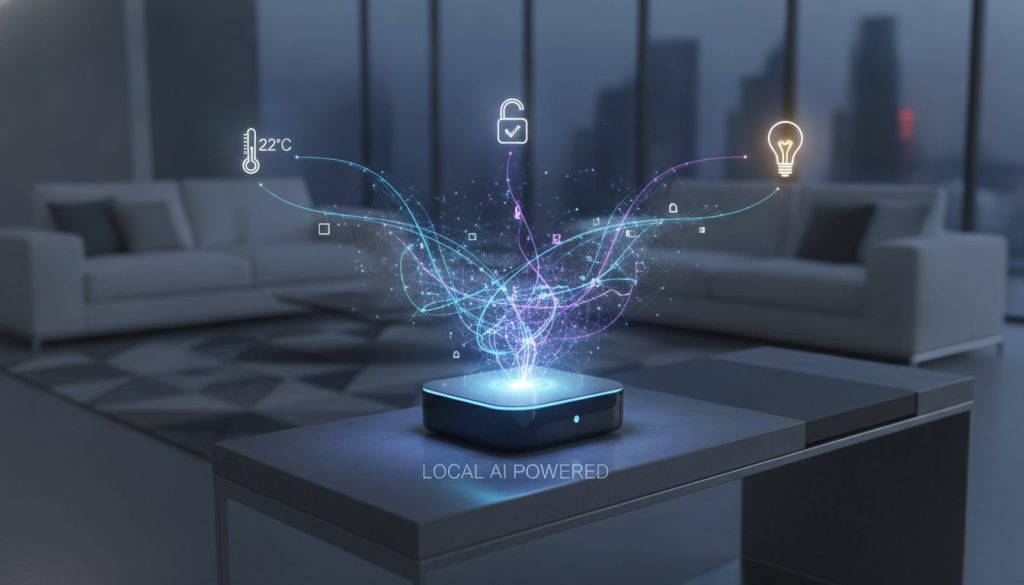
Your smart speaker might actually be the “dumbest” part of your home automation setup. While it’s great for playing music or checking the weather, relying solely on a voice assistant often leads to a “smart home” that’s disconnected and unreliable. In 2026, the real choice in the smart home hub vs smart speaker debate is about moving beyond simple voice commands toward true, local intelligence. You shouldn’t have to worry about your lights failing or your security sensors lagging just because your internet connection is acting up.
We know how overwhelming it feels to juggle terms like Thread, Zigbee, and Matter while fearing your next purchase won’t be compatible with what you already own. This article will help you clear the technical fog and discover the critical differences between these two types of hardware. You’ll get a clear roadmap for building a seamless, stress-free automated home that uses the latest Matter 1.5.1 standards to your advantage. We’ll show you how to choose the right brain for your house so you can finally enjoy the peace of mind that comes with technology that truly serves you.
Key Takeaways
- Learn the fundamental difference between a device that just listens and one that actually processes complex tasks for your home.
- Navigate the smart home hub vs smart speaker choice by identifying which hardware supports protocols like Zigbee and Thread for a more stable network.
- Discover how to spot “Hybrid Devices” in your current setup so you can avoid buying unnecessary hardware.
- Master the use of conditional logic to create proactive automations that run your home without you saying a single word.
- Follow a simple, step-by-step roadmap to audit your tech and build a future-proof system that remains functional even during internet outages.
Understanding the Basics: Is it a Voice Assistant or a Central Controller?
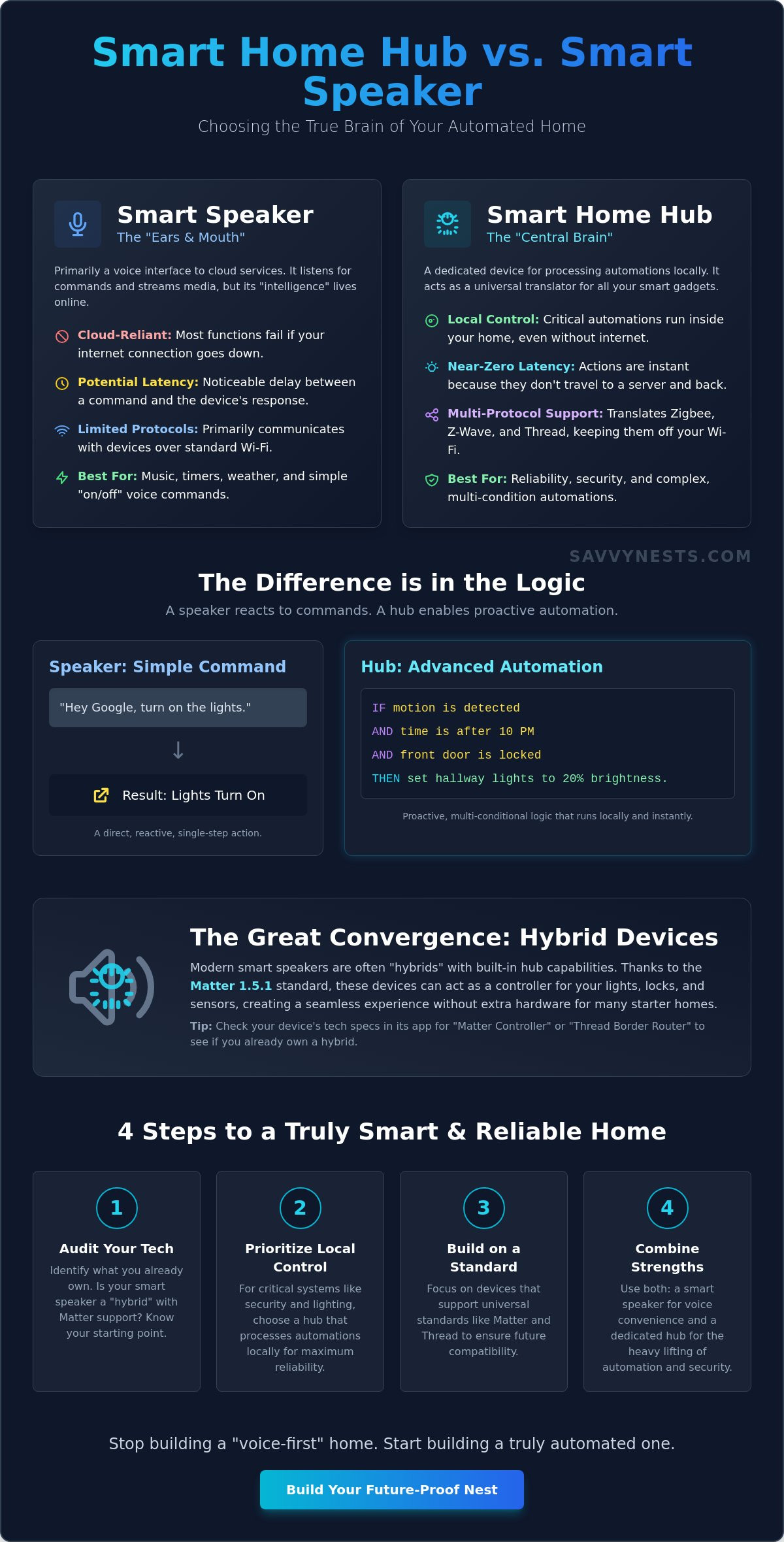
Most people start their automation journey with a device they can talk to. It feels like magic to say a command and watch your living room dim for movie night. However, there’s a fundamental distinction in the smart home hub vs smart speaker debate that often gets lost in the marketing noise. Think of your smart speaker as the ears and mouth of your home. It listens to your requests and speaks back with information. A dedicated hub, meanwhile, acts as the central brain. It’s the processor that makes decisions, manages complex schedules, and ensures everything talks to everything else without your intervention.
The confusion exists because the lines have blurred significantly. In 2026, many high-end speakers now include basic hub hardware inside them. This “Great Convergence” makes it tempting to think you only need one device. But a savvy homeowner knows that a “voice-first” home is very different from a truly “automated” home. Understanding which role each device plays is the first step toward reducing tech stress and avoiding a drawer full of incompatible gadgets.
What a Smart Speaker Actually Does
A smart speaker is primarily an interface. Its main job is to connect you to a voice assistant in the cloud. Whether you prefer the popular line of smart speakers or another ecosystem, these devices are built for streaming music, setting timers, and answering questions. They act as a gateway for Wi-Fi-based devices like basic smart plugs or bulbs. The catch is that these speakers usually rely on “Cloud-only” control. If your internet goes down, your “smart” lights often become unresponsive. This dependency creates latency, which is that annoying two-second delay between your command and the light actually turning on.
The Secret Power of a Dedicated Hub
A dedicated smart home hub is built for reliability and deep integration. While speakers mostly talk over Wi-Fi, a hub translates specialized languages like Zigbee, Z-Wave, and the newer Thread protocol. This allows you to connect hundreds of tiny sensors, like leak detectors or motion triggers, without slowing down your home’s Wi-Fi router. More importantly, hubs execute “local” automations. This means the logic lives on the device itself. If a pipe bursts at 3:00 AM and your internet is out, a dedicated hub can still tell your smart valve to shut off the water. It doesn’t need to ask a server in another state for permission to protect your home. This local processing is the key to a fast, responsive, and fail-safe environment.
Choosing between a smart home hub vs smart speaker isn’t always an “either-or” decision. Most successful setups use both. You use the speaker for the convenience of voice control and the hub for the heavy lifting of security and complex automation. Knowing this difference now prevents the frustration of buying “dumb” smart devices that can’t talk to each other when it matters most.
The Great Convergence: When Your Smart Speaker is Secretly a Hub
The lines between different gadgets have blurred significantly. In 2026, the debate over smart home hub vs smart speaker isn’t just about two different boxes on your shelf. It’s about the invisible radios inside them. Many of the latest devices are now “Hybrids.” These are speakers that look like standard audio equipment but contain the same processing chips found in high-end automation controllers. With tech giants re-entering the smart speaker market with beefed-up hardware, your next purchase might actually handle everything you need in a single unit.
The release of the Matter 1.5.1 specification on March 31, 2026, changed the landscape forever. This universal standard allows devices from different brands to talk to each other without needing a specific “translator” hub. If your speaker is a Matter Controller, it can manage your lights, locks, and even your soil moisture sensors regardless of who manufactured them. For a starter smart home, a hybrid device is often enough to create a seamless experience without the extra cost of a standalone processor.
Checking Your Current Hardware
You don’t always need to buy new gear to get hub-like features. You can find out what your current device is capable of by following a few simple steps in your management app. Open your Alexa or Google Home app, select your device, and look under “Technical Specifications” or “Device Information.” Look specifically for the words Zigbee, Thread, or Matter. If you see these listed, your speaker can communicate directly with sensors without needing a secondary bridge. A Thread Border Router is the essential 2026 connectivity standard that bridges your low-power Thread devices to your home network. If you’re still confused about what your specific model can do, our detailed hardware reviews can help you identify your device’s hidden powers.
Hybrid vs. Dedicated: The Trade-offs
While hybrids are convenient, they aren’t always the best choice for every home. Dedicated hubs still hold the crown when it comes to raw processing power. If you have fifty or more devices, a hybrid speaker might struggle to keep up, leading to laggy responses. Professional-grade hubs also feature external antennas that provide better range and reliability through thick walls.
Privacy is another major factor. Most smart speakers process your data in the cloud, which means your home’s activity is being sent to a remote server. Dedicated hubs often prioritize local data processing. This keeps your daily routines private and ensures your automations stay functional even if the company’s servers go offline. Choosing the right smart home hub vs smart speaker setup depends on whether you value simple convenience or robust, private control.
Ecosystem Wars: Choosing Your Home’s “Primary Language”
Before you buy your next smart lightbulb, you need to decide which “language” your home will speak. In the smart home hub vs smart speaker debate, your choice of ecosystem acts as the operating system for your daily life. While the Matter 1.5.1 standard now allows for “Multi-Admin” control, which lets you control the same device from two different apps, having a primary ecosystem reduces technical friction. Our “Savvy” rule is simple: pick one main platform and stick to it for your core automations. This ensures a stress-free experience where your devices work together in harmony rather than competing for control.
Your choice of ecosystem dictates your hardware strategy. If you choose Apple, you’ll need a HomePod or Apple TV to act as your hub. If you go with Amazon, an Echo device might handle everything. This decision impacts your budget, your privacy, and how much time you’ll spend “fixing” things when they go wrong. By committing to one primary brain, you simplify your setup and make it much easier for everyone in the household to use the technology.
Amazon Alexa: The King of Compatibility
Alexa remains the most accessible entry point for most people. With affordable hybrid speakers and compatibility with a massive range of third-party gadgets, it’s the easiest way to get started quickly. Amazon has expanded its “intelligence” features with the Alexa+ subscription, which is free for Prime members or $19.99/month for others as of June 2026.
- Pros: Massive device support and affordable hybrid hardware that often goes on sale.
- Cons: Heavy reliance on the cloud and frequent “By the way” voice suggestions that can feel intrusive.
- Best for: Renters and those who want the widest variety of cheap, compatible devices.
Google Home: The Intelligence Leader
Google excels at understanding natural language. If you’re already using an Android phone or Google Workspace, this integration feels seamless and intuitive. Google has recently focused on powerful automation scripts that allow for more complex “If This, Then That” scenarios.
- Pros: Best-in-class voice recognition and deep integration with Google services.
- Cons: The hardware ecosystem can feel fragmented, and some older features are occasionally moved or retired.
- Best for: Users who want the smartest voice assistant and are already deep in the Google universe.
Apple Home: The Privacy Fortress
Apple prioritizes your security above all else. Unlike other platforms, most Apple Home commands happen locally on your network. This “local-first” architecture means your data stays in your house, not on a corporate server. The Apple HomePod mini remains a popular, secure entry point at $99.
- Pros: Superior local control, end-to-end encryption, and a very polished user interface.
- Cons: Stricter device requirements often mean a higher entry cost for compatible accessories.
- Best for: iPhone users who prioritize security and want a system that works even when the internet is down.
Why Advanced Automations Still Need a “Real” Hub
A voice command is really just a digital chore. When you tell your speaker to “turn on the lights,” you’re still the one doing the thinking. True automation happens when your home anticipates your needs without you saying a single word. This is where the smart home hub vs smart speaker debate becomes critical. While speakers are excellent at receiving commands, dedicated hubs excel at executing complex, conditional logic. They allow you to create “If this, then that, but only if…” scenarios that basic voice assistants simply can’t handle with the same level of sophistication.
Reducing tech friction means removing the need for manual intervention. A dedicated hub acts as a local manager that monitors every sensor in your house simultaneously. It doesn’t just wait for a voice trigger; it looks for patterns. This local-first approach is also a savvy security choice. By keeping your automation logic inside your four walls, you ensure your home remains intelligent even if your internet service provider has an outage. You gain a level of reliability that cloud-dependent speakers just can’t match.
Real-World Examples of Hub-Powered Magic
Imagine walking into your kitchen at 2:00 AM. A basic smart speaker might turn the lights on at full brightness because a motion sensor was tripped. A hub, however, uses multi-sensor routines to create the perfect ambiance. It sees that it’s late at night, the light levels are already low, and the motion is in the kitchen, so it gently dims the under-cabinet lighting to 10 percent. These sophisticated layers of logic are detailed in our smart home buying guide, which helps you choose gear that supports these “invisible” routines. Safety is another area where hubs shine. A hub can detect a leak under your sink and immediately signal a smart valve to shut off the water main, all without needing to check with a cloud server first.
The Latency Advantage
Speed is the invisible factor that determines if a smart home feels like a luxury or a nuisance. When you use a cloud-based speaker, your request must travel to a remote server and back before anything happens. This “Cloud Round-Trip” often creates a 2-second delay that feels like an eternity when you’re standing in a dark hallway. Local processing through a hub provides an instant response because the signal never leaves your house. Local processing effectively eliminates the “I’m sorry, I can’t reach the internet right now” error that often leaves your home unresponsive during a web glitch.
Building a home that works for you requires the right foundation. If you’re ready to move beyond simple voice commands, you can explore our latest home automation tips to find the perfect controller for your needs.
Building Your Savvy Nest: The Step-by-Step Starter Strategy
Creating a modern home doesn’t require a massive upfront investment or a degree in computer science. The most successful setups grow organically. Before you spend a single dollar, perform a quick audit of your current gadgets. You might already own a device that acts as a bridge. Once you know what you have, define exactly what you want to achieve. Instead of buying every sensor on the shelf, start with a specific problem, like reducing your energy bill or automating your morning coffee. This targeted approach prevents the tech stress that comes with managing too many new devices at once.
Your choice in the smart home hub vs smart speaker journey should align with your lifestyle. If you use an iPhone and value privacy, your roadmap will look different than someone who prefers the affordability of the Amazon ecosystem. Your home size also matters. A small apartment can often thrive on a single hybrid speaker, while a multi-story house with fifty devices will eventually need the dedicated processing power of a standalone hub.
Phase 1: The Hybrid Start
For most beginners in 2026, a high-end smart speaker is the perfect first step. Look for a model that includes a Thread Border Router. This allows you to connect Matter-over-Thread devices directly to your network without extra hardware. This setup is simple, clean, and incredibly easy to manage through a single app. As you get comfortable, you can learn how to create smart home routines that handle your lighting and temperature automatically. Focus on Wi-Fi and Matter-compatible gear early on to keep your system flexible and future-proof.
Phase 2: Scaling to a Dedicated Hub
You’ll know it’s time to upgrade when your “smart” home starts feeling slow. If you cross the 20-device threshold or want to add specialized Zigbee sensors for security, a dedicated hub becomes essential. You don’t have to throw away your speakers. You can integrate a pro-grade controller, like an Aeotec or Homey hub, to handle the heavy logic while keeping your speakers for voice commands. This two-tier strategy gives you the best of both worlds: the convenience of voice and the rock-solid reliability of local processing. Remember, the goal of the smart home hub vs smart speaker debate isn’t to buy the most expensive gear. It’s to find the balance that makes your life easier, not more complicated.
Take Control of Your Automated Future
Building a home that truly understands your needs is finally within reach. By now, you know that the smart home hub vs smart speaker decision isn’t about choosing one over the other; it’s about understanding which device should handle the heavy lifting. While speakers offer the convenience of voice, a dedicated hub provides the local intelligence and privacy that makes a house feel truly smart. Remember to start with a clear problem you want to solve, audit the hardware you already own, and choose an ecosystem that matches your daily habits.
You don’t have to tackle this transition alone. We’ve done the research so you can skip the tech stress and get straight to the benefits of a seamless home. Ready to build your dream setup? Check out our Ultimate Smart Home Buying Guide for 2026! Our guide includes 2026-updated compatibility charts, beginner-friendly “no-jargon” explanations, and tested recommendations for every budget. You have the tools to master your environment. With the right strategy, your home will be more reliable and responsive than ever before.
Common Questions About Home Automation Brains
Do I need a hub if I only have smart bulbs?
You don’t need a hub if your smart bulbs connect directly via Wi-Fi or Bluetooth. Most entry-level bulbs are designed to work this way so you can control them using just a phone app or a basic speaker. However, if you choose professional-grade Zigbee bulbs, you’ll need a hub or a hybrid speaker to translate the signals and keep your home network from getting congested.
Can I use Alexa as a hub for Google Home devices?
No, you generally can’t use Alexa to directly manage devices that are exclusive to the Google Home ecosystem. While the Matter standard allows many new gadgets to show up in both apps simultaneously, the two platforms remain separate “brains.” You’ll still need to use the native Google Home app for specific settings or firmware updates that Alexa doesn’t support.
Does Matter mean I don’t need a smart home hub anymore?
You still need a hub, but it’s now often called a Matter Controller. Matter is the language devices use to talk, but they still need a hardware “brain” to coordinate those conversations. When looking at the smart home hub vs smart speaker landscape, remember that a Matter-compatible device is essential for bridging your different gadgets into one cohesive, responsive system.
What happens to my smart home if the internet goes out?
Your cloud-connected devices will stop responding, but any automations stored locally on a dedicated hub will keep working perfectly. Basic smart speakers usually lose all functionality without a web connection. This is why savvy homeowners often choose a local-first hub for critical tasks like security sensors or hallway lighting, ensuring the house stays functional during a Wi-Fi glitch.
Is a smart speaker the same as a voice assistant?
No, the smart speaker is the physical piece of hardware you place on your counter, while the voice assistant is the AI software living inside it. You can access a voice assistant like Siri or Alexa on your smartphone or tablet without ever owning a speaker. The speaker simply provides a convenient, hands-free way to interact with that software in your living space.
Which smart home hub is the easiest for beginners to set up?
A hybrid smart speaker is the easiest starting point for most beginners because the setup is almost entirely automated. If you’re ready for more power, the Samsung SmartThings ecosystem is a fantastic choice in the smart home hub vs smart speaker debate. It offers an intuitive mobile app that supports over 5,000 different devices, making it simple to grow your system over time.
Can I hide my smart home hub in a cabinet?
Yes, you can hide your hub, but you should avoid placing it inside metal cabinets or behind very thick furniture. These materials can block the radio signals your hub uses to talk to your sensors and bulbs. For the best reliability, try to place the unit in a central, relatively open area where its Zigbee or Thread signals can reach every corner of your home.
Do smart speakers always listen to your conversations?
Smart speakers are designed to listen only for their specific “wake word” using local processing on the device. They don’t record your private conversations or send audio to the cloud until they hear that trigger word. Most modern speakers also include a physical mute switch that electronically disconnects the microphones, giving you total control over your privacy whenever you need it.