

You don’t need a Silicon Valley salary to live in a home that feels like it’s from the future. While it’s easy to feel overwhelmed by the sheer number of gadgets on the market, building a smart home on a budget in 2026 is more achievable than ever before. You’ve likely worried about wasting money on devices that won’t work together or getting hit with “hidden” monthly fees just to see your own front porch. It’s a common frustration; however, the truth is that the best automation strategies focus on value and interoperability rather than high price tags.
This guide provides a clear roadmap to help you automate your space for under $200 while completely avoiding recurring subscription costs. We’ll show you how to leverage the Matter standard to ensure your devices play nice, regardless of the brand. You will learn which high-value picks, like the $35 Echo Dot or $10 Kasa smart plugs, offer the most “magical” convenience for your dollar. From choosing the right ecosystem to checking for that elusive C-wire, you’re about to transform your living space into a savvy, stress-free nest.
Key Takeaways
- Learn to distinguish between “cheap” gadgets and “savvy” investments that offer high utility without sacrificing quality or reliability.
- Discover why selecting the right foundation is the most critical step in building a smart home on a budget and how it prevents redundant hardware costs.
- Identify the “hardware trap” to avoid hidden monthly fees by choosing devices that offer local storage and out-of-the-box functionality.
- Unlock the essential starter kit categories that provide the most immediate convenience and “magical” impact for less than $100.
- Follow a clear, two-phase roadmap to expand your automation from basic lighting to a full-security and energy-saving setup for under $250.
The Savvy Approach: Defining a Smart Home on a Budget
Building a smart home on a budget isn’t about finding the lowest price tag on a clearance shelf. It’s a strategic choice to invest in high-utility automation that offers minimal upfront costs and zero recurring subscription fees. Many homeowners still believe that home automation or domotics requires a full renovation or a massive bank account. In reality, the technological landscape of 2026 has made “savvy” builds accessible to everyone. With the widespread adoption of Matter and Thread standards, devices now communicate across different brands with ease. This means you can mix and match high-value products without worrying about them becoming obsolete or failing to work together.
The difference between “cheap” and “savvy” is fundamental. A cheap device often relies on poor-quality components and buggy, cloud-dependent apps that might vanish in a year. A savvy choice focuses on a high value-to-price ratio. You’re looking for hardware that is reliable, secure, and works locally within your house. You don’t need thousands of dollars to feel the “magic” of a connected home. You just need a plan that prioritizes function over flashiness. To find devices that meet these criteria, you can explore the curated options at MG Affiliate Store.
Value Over Price: What to Look For
When you’re shopping, prioritize multi-functional devices. A single sensor that detects both motion and light levels can trigger your hallway lights at night and close your smart blinds when the afternoon sun gets too bright. This double-duty approach saves you from buying two separate gadgets. Always look for local control. This ensures your home stays smart even if your internet connection drops. Be wary of “no-name” brands. While their prices are tempting, they often lack long-term app support, which can turn your smart investment into a paperweight within months.
The ‘Big Three’ Benefits of Going Smart for Less
- Energy Savings: Budget-friendly smart thermostats and plugs often pay for themselves. By automatically cutting power to “vampire” electronics or adjusting the temperature when you’re out, they lower your monthly utility bills.
- Convenience: Small wins create the biggest impact on your daily flow. Imagine your coffee machine starting as your alarm goes off or your lights dimming automatically for movie night.
- Security: You can gain incredible peace of mind through entry-level sensors. Affordable door and window sensors provide instant alerts to your phone, giving you a security layer that doesn’t require a professional monitoring contract.
Choosing Your Foundation: Budget-Friendly Ecosystems
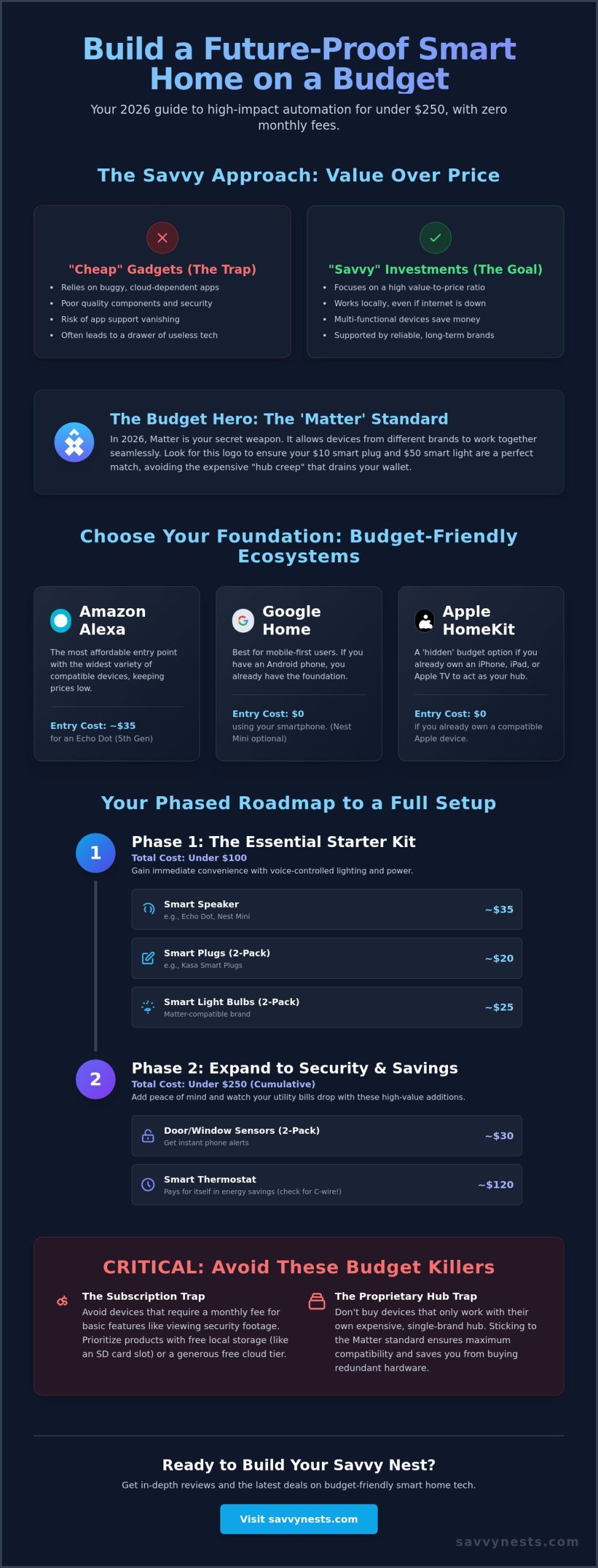
Picking your ecosystem is the most critical decision you’ll make when building a smart home on a budget. Think of this as choosing the “brain” of your house. If you start without a plan, you’ll likely end up with a drawer full of proprietary hubs and bridges that don’t talk to each other. In 2026, the Matter standard has become the ultimate budget hero. It allows you to mix and match different brands, ensuring a $10 smart plug works just as well as a $50 one. By picking one primary ecosystem now, you avoid the “hub creep” that quietly drains your wallet. If you’re just getting started and want a stress-free introduction to the basics, our guide to home automation for beginners walks you through every foundational concept you need to know.
Each major platform has an “entry cost” that usually revolves around a smart speaker or hub. While you can use your phone, having a dedicated voice interface makes the experience feel much more seamless. Sticking to one platform doesn’t just save money; it reduces the time you’ll spend troubleshooting. If you’re unsure which devices offer the best value for your chosen system, our smart device reviews provide a clear breakdown of performance versus price.
Amazon Alexa: The King of Budget Hardware
Amazon’s ecosystem is often the most affordable entry point because they frequently discount their own hardware. The Echo Dot (5th Gen) is currently available for just $35, offering a low-cost way to add voice control to any room. There is a massive variety of “Works with Alexa” third-party devices, which keeps competition high and prices low. The main trade-off is that the Alexa app can feel cluttered with advertisements for other Amazon services, but for pure hardware value, it’s hard to beat.
Google Home: Best for Mobile-First Budgets
If you already own an Android smartphone, you’ve already started your smart home. Google Home leverages your existing devices, making it a zero-cost foundation. Adding a Nest Mini provides a budget-friendly voice interface that integrates perfectly with your Google Calendar and Maps. Google’s ecosystem is particularly good at handling budget-tier cameras and smart displays, providing a clean interface that is easy for beginners to master without extra spending.
Apple HomeKit: The ‘Hidden’ Budget Option
Apple is rarely associated with the word “budget,” but it can be surprisingly cost-effective. The HomePod Mini costs $99 and functions as a high-value hub with a built-in Thread border router. Because HomeKit has strict requirements for local control, you often don’t need to buy separate bridges for your devices. You’ll spend slightly more on individual gadgets, but you’ll save on additional hardware and enjoy a more secure, privacy-focused environment that doesn’t rely on cloud subscriptions.
The Essential Starter Kit: High Impact for Under $100
You don’t need a massive budget to experience the “magic” of a connected home. In fact, some of the most impressive automations come from simple, inexpensive devices that cost less than a takeout dinner. The secret to building a smart home on a budget lies in identifying the high-impact categories that change your daily routine immediately. By spending less than $100, you can secure your entry points, automate your morning coffee, and ensure you never walk into a dark room again. For a detailed breakdown of specific models, our smart home buying guide offers a deeper dive into current high-value hardware.
Lighting on a Dime
Lighting is often the first step for many, and for good reason. It provides instant visual feedback and convenience. If you’re a renter, smart bulbs are your best bet. They’re affordable, easy to install, and you can take them with you when you move. Homeowners might find better value in smart switches, which control every bulb on a single circuit. While WiFi bulbs are great because they don’t require a hub, Zigbee or Thread-enabled bulbs are more reliable if you plan to install more than ten. A savvy pro tip: don’t waste money on expensive smart bulbs for floor lamps. Use a cheap smart plug instead to get the same automation for a fraction of the cost.
The Power of the Smart Plug
Smart plugs are the ultimate tool for making “dumb” appliances intelligent for pennies. These small adapters allow you to control almost anything with a physical on/off switch. Creative uses include automating your coffee maker to start as you wake up or setting fans to turn off when you leave the room. Many modern plugs, like the $10 TP-Link Kasa models, now include energy monitoring. This feature helps you identify “vampire” appliances that drain power while idle, eventually helping the device pay for itself through lower utility bills. Always select a slim design to ensure your other wall outlet remains free for use.
Sensors: The Secret to True Automation
Sensors are the most underrated part of a budget setup. While voice control is fun, true automation happens when your home reacts to you without a word. A $15 motion sensor in a hallway or bathroom eliminates the need to fumble for switches in the dark. Contact sensors on doors and windows are equally powerful. They act as a budget-friendly security layer by alerting your phone if a door is opened while you’re away. This “set it and forget it” technology creates a seamless experience that makes your home feel truly intelligent and intuitive.
Avoiding the Budget Killers: Subscriptions and Hidden Costs
The biggest threat to your smart home on a budget isn’t the initial price of the hardware. It’s the “Hardware Trap.” This happens when you buy a cheap camera or doorbell only to realize that viewing your own footage requires a monthly fee. These costs are often hidden in fine print, but they add up fast. Research shows that typical smart home subscriptions for video doorbells and cloud storage range from $3 to $20 per month. Even at the lowest tier, you’ll spend $180 over five years just to keep your device functional. That is more than double the price of many entry-level cameras.
To keep your setup savvy, you must look for devices that offer local storage options. Look for products with a physical SD card slot. This allows the device to record directly to a memory card you own, completely bypassing the need for a cloud plan. Beyond subscriptions, don’t overlook the hidden cost of disposable batteries. A “cheap” motion sensor that eats through two CR123A batteries every six months will eventually cost more than a premium wired or rechargeable version. Prioritize devices that use common, rechargeable cells or plug directly into a wall outlet to keep your long-term maintenance costs at zero.
The True Cost of ‘Cheap’ Cameras
When comparing cameras, calculate the five-year total cost of ownership. A “budget” camera might cost $30 today, but if it requires a $5 monthly plan, your total cost hits $330. In contrast, a device like the Aqara Camera E1 costs $60 and supports local storage or HomeKit Secure Video without extra fees. Brands that offer free basic cloud clips or SD card recording are the real winners here. Choosing a slightly more expensive camera with local storage is a savvier choice because it protects your privacy and your wallet simultaneously. For more ways to save, check out our latest home automation tips and hacks to optimize your setup.
The Hub-Free Strategy
Another hidden expense is the “Hub Tax.” This occurs when every new brand you buy requires its own $50 bridge or gateway to connect to the internet. For small setups, focus on WiFi or Matter-over-WiFi devices that connect directly to your router. You only need a dedicated hub when you expand to dozens of devices. In those cases, moving to a Zigbee 3.0 or Thread-based hub makes sense because the individual sensors are significantly cheaper. You can also save money by choosing a smart speaker that doubles as a hub. The Apple HomePod Mini, for example, includes a Thread border router, eliminating the need to buy a separate piece of hardware to manage your network.
Your Phased Roadmap to a $250 Whole-Home Setup
Building a smart home on a budget is a marathon, not a sprint. One of the biggest mistakes beginners make is trying to automate every room in a single weekend. This often leads to technical headaches and buyer’s remorse when devices don’t fit your actual daily habits. A phased approach allows you to master one layer of technology before adding the next, ensuring every dollar spent adds real value to your life. By following this six-month roadmap, you can achieve a fully connected home for approximately $250 without ever feeling overwhelmed. If you’re brand new to connected devices, our friendly roadmap to home automation for beginners is the perfect companion to help you build confidence at every stage.
Timing your purchases is the ultimate savvy move. Major sales events like Prime Day or Black Friday are when hardware prices hit their lowest points. For example, the Amazon Echo Dot (5th Gen) often drops to $35 from its regular $50 price tag during these windows. If you can wait for these discounts, you can stretch your $250 budget to include even more sensors or higher-end lighting strips.
Phase 1: Lighting and Control (Month 1)
Start with the “Convenience Kickstart.” Your goal here is to establish voice control and automate the lighting in your most-used room. Pick up a basic smart speaker and two high-quality smart bulbs. Once installed, set up your first “Goodnight” routine to turn off all lights with a single phrase. This immediate win proves the value of automation right away.
- Estimated Cost: $55 (based on a $35 smart speaker and $20 for a pair of budget-friendly bulbs).
Phase 2: Security and Climate (Month 3)
Once you’re comfortable with voice commands, focus on “Security and Savings.” This layer adds protection and begins to pay for itself through energy efficiency. Add a budget-friendly video doorbell, like the Arlo 2K model which is currently verified at $41 on sale. Combine this with a smart thermostat. A savvy tip: check your utility company’s website for rebates. Many providers offer coupons that can bring the price of a $60 Amazon Smart Thermostat down to nearly zero.
- Estimated Cost: $120 (including a video doorbell, entry sensors, and a smart thermostat).
Phase 3: Advanced Routines (Month 6+)
The final phase is about “Full Automation.” Now that your foundation is secure, add smart plugs to kitchen appliances and office gear. This is also the time to integrate niche gadgets like leak sensors under your kitchen sink. These $20 devices can prevent thousands of dollars in water damage, making them a high-value addition to your savvy nest. You’re no longer just turning things on with your voice; your home is now reacting to your environment automatically.
- Estimated Cost: $75 (for a pack of smart plugs and two leak sensors).
Start Your Savvy Transformation Today
Building a smart home on a budget isn’t about compromising on quality. It’s about making intentional choices that prioritize long-term value over flashy, subscription-heavy gadgets. By choosing a solid ecosystem foundation and sticking to a phased roadmap, you can transform your living space into a convenient, secure environment for less than $250. Remember that local storage is your best friend for avoiding hidden fees, and the Matter standard ensures your devices will work together for years to come.
You’ve already learned how to spot the “Hardware Trap” and how to leverage smart plugs for instant wins. Now, it’s time to turn those plans into reality. We provide expertly vetted no-subscription recommendations and Matter-ready device focuses to help you succeed. Whether you need step-by-step beginner tutorials or deep dives into specific hardware, we’re here to guide you every step of the way. Build your Savvy Nest today with our curated gear guides! You have the tools and the strategy; your smarter, more efficient home is just a few clicks away.
Frequently Asked Questions
Is a smart home on a budget actually secure?
Yes, a budget setup is secure if you choose reputable brands that prioritize local control. Many affordable Matter-ready devices keep your data on your local network rather than the cloud, which reduces the risk of remote hacks. Always change default passwords and keep your device firmware updated to maintain a safe environment for your family.
Do I need a high-speed internet connection for a budget smart home?
You don’t need a high-speed fiber connection for basic automation, but a stable router is essential. Most smart devices use very little bandwidth to send simple on or off commands. However, if you plan to install multiple budget cameras, you’ll need enough upload speed to handle the video streams without slowing down your other online activities.
What is the best cheap smart home brand to start with?
TP-Link Kasa and Wyze are widely considered the best entry-level brands for a smart home on a budget. Kasa offers reliable smart plugs for about $10, while Wyze provides feature-rich thermostats for $69.99. These brands offer a great balance of low upfront costs and solid app support that won’t disappear overnight.
Can I build a smart home without a hub?
You can definitely build a smart home without a hub by choosing WiFi-based devices. These gadgets talk directly to your home router, making them perfect for beginners who want to keep things simple. While this is great for a start, remember that adding dozens of WiFi devices can eventually strain your network, making a hub a savvy future upgrade.
How much does it cost to run a smart home monthly?
Your monthly cost can be zero if you choose the right hardware. By avoiding subscription-heavy cameras and choosing local storage options, you eliminate recurring fees entirely. In fact, using a smart thermostat can save you around 10 to 15% on heating and cooling costs, which often offsets the tiny amount of electricity your devices consume.
Do budget smart devices work with both Alexa and Google?
Most modern budget devices are compatible with both Alexa and Google Assistant. Manufacturers want to reach the widest audience possible, so they usually support both major platforms. To be safe, always check the packaging for the “Works with Alexa” or “Works with Google Home” badges or the Matter logo before you make a purchase.
Are smart bulbs or smart switches cheaper for a whole house?
Smart switches are typically the cheaper option for a whole-house setup. A single $20 switch can control a ceiling fixture with five bulbs, whereas buying five individual smart bulbs would cost significantly more. Bulbs are only the cheaper choice for individual floor lamps or small apartments where you don’t want to change any permanent wiring.
Can I take my budget smart home devices with me if I move?
Most smart home on a budget devices are incredibly portable and easy to move to a new location. Smart plugs, bulbs, and battery-powered sensors can be unplugged and packed in minutes. If you are renting, these non-permanent options are the best way to enjoy automation without losing your security deposit or leaving your investment behind.

Article by
Michael J. Mahon
Smart home automation transforms ordinary homes into intelligent living spaces by connecting devices that improve convenience, security, energy efficiency, and comfort. SavvyNests makes smart home technology easy to understand with expert guides, reviews, and recommendations for every budget.