
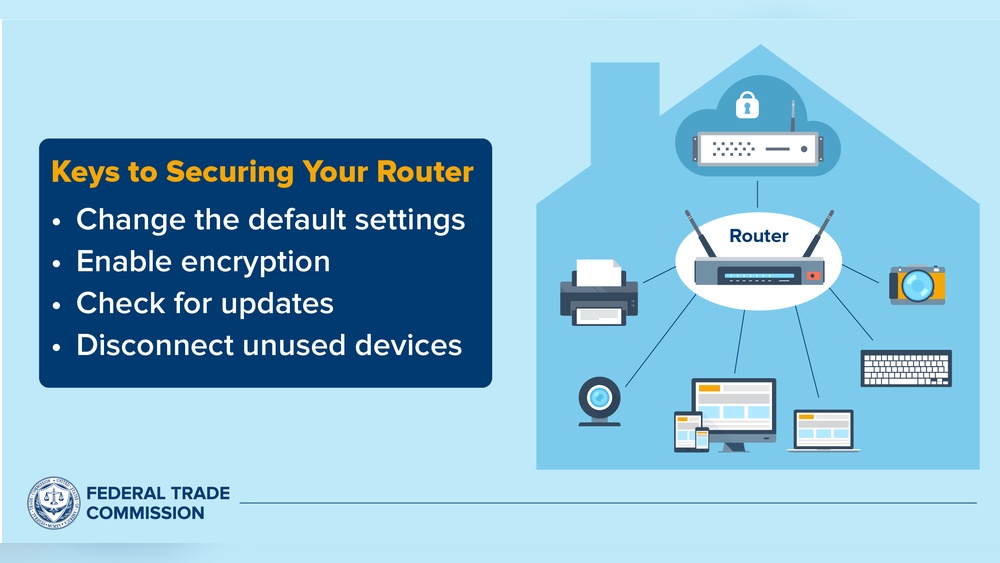
Smart homes are becoming very popular. Many people use smart devices like cameras, lights, and speakers. These devices help make life easier. But they can also bring risks. Hackers might try to get into your home network. They want to see your personal information or control your devices. So, it is important to protect your smart home network. Let’s learn how to keep your smart home safe.

Credit: cias.utsa.edu
Credit: www.rambus.com
What Is a Smart Home Network?
A smart home network is the system that connects all your smart devices. These devices talk to each other and the internet. Your home Wi-Fi usually connects them. This network lets you control lights, locks, cameras, and more from your phone or voice.
But because these devices connect to the internet, they can be targets. Hackers might try to break in and cause trouble. That is why securing your smart home network is very important.
Why Do Hackers Target Smart Home Networks?
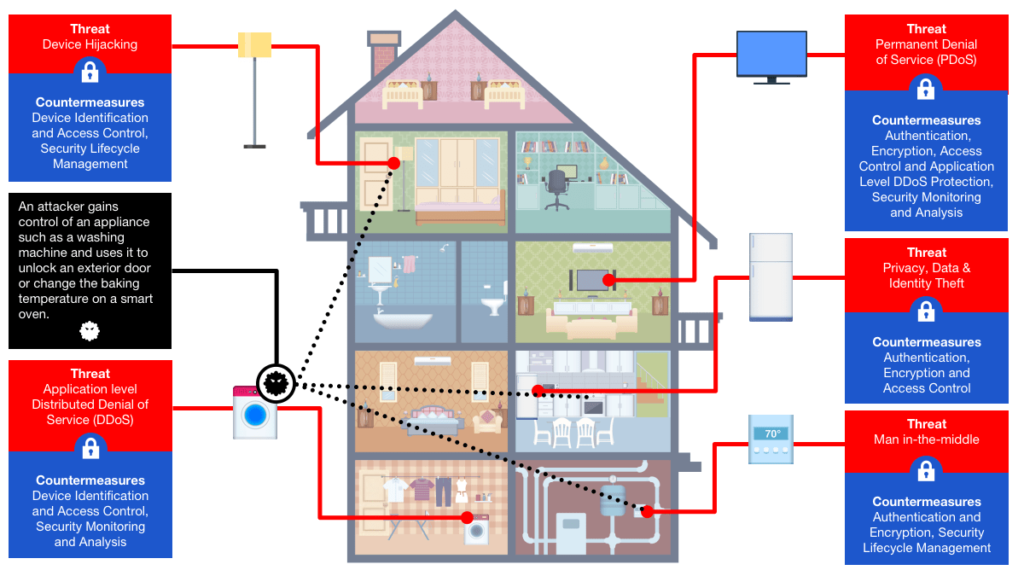
Hackers want to steal information. They may want to spy on you or steal your data. Sometimes they want to use your devices to attack other systems. Your smart home devices may have weak security. This makes it easier for hackers to enter.
If a hacker controls your smart devices, they can:
- Watch through your cameras
- Unlock your doors
- Listen to your conversations
- Turn devices on or off
That sounds scary. But you can stop it. By following some easy steps, you can protect your home network.
Steps to Secure Your Smart Home Network
Here are some simple ways to keep hackers away:
1. Change Default Usernames And Passwords
Most smart devices come with default usernames and passwords. These are easy for hackers to guess. Always change them as soon as you set up your device. Use strong passwords. A strong password has letters, numbers, and symbols. Avoid using simple words or easy numbers like “1234.”
2. Use A Strong Wi-fi Password
Your Wi-Fi password protects your whole network. Make it long and hard to guess. Use a mix of letters and numbers. Do not share it with many people. Change it every few months if you can.
3. Keep Your Devices Updated
Smart devices need software updates. These updates fix security problems. Sometimes, hackers find new ways to break in. Updates close these holes. Check your devices often for updates. Turn on automatic updates if possible.
4. Use A Separate Network For Smart Devices
You can create a guest network on your Wi-Fi router. Use this network only for your smart devices. Keep your computers and phones on your main network. This way, if a smart device is hacked, your important data stays safe.
5. Turn Off Devices When Not In Use
If you do not need a smart device all the time, turn it off. Hackers cannot attack devices that are off. This also saves electricity.
6. Disable Unused Features
Some devices have features you never use. For example, voice control or remote access. Turn off these features to reduce risks. Less open doors for hackers.
7. Use Two-factor Authentication (2fa)
Many smart home apps let you use 2FA. This means you need two ways to prove who you are. Usually, a password and a code sent to your phone. This extra step makes it harder for hackers to get in.
8. Monitor Your Network
Keep an eye on your network activity. Some routers and apps show which devices are connected. Look for unknown devices. If you see something strange, disconnect it and change your passwords.
9. Secure Your Router
Your router is the heart of your home network. Protect it well. Change its default login and password. Keep its firmware updated. Turn off remote management unless you need it.
10. Use Encryption
Encryption scrambles data so others cannot read it. Use Wi-Fi security like WPA3 or WPA2. Avoid old security types like WEP. Encryption helps keep your information safe when sent over the network.
Table: Quick Tips to Secure Your Smart Home
| Tip | What to Do |
|---|---|
| Change Default Passwords | Use strong and unique passwords for all devices. |
| Strong Wi-Fi Password | Create a long password with letters and numbers. |
| Software Updates | Keep devices and router updated regularly. |
| Separate Network | Use a guest network for smart devices. |
| Turn Off Devices | Switch off devices when not in use. |
| Disable Unused Features | Turn off features you do not need. |
| Two-Factor Authentication | Use 2FA for smart home apps. |
| Monitor Network | Check connected devices often. |
| Secure Router | Change router login and keep it updated. |
| Use Encryption | Choose WPA3 or WPA2 for Wi-Fi security. |
Why Is It Important to Protect Your Smart Home?
Your smart home holds private information. It knows when you are home or away. It controls your lights and locks. If a hacker gets in, your privacy is lost. They can cause damage or steal your identity. Protecting your smart home keeps your family safe.
Also, a hacked device can slow down your internet. It might send spam or attack others. This can get you in trouble. So, good security helps everyone.
What to Do If You Think Your Smart Home Is Hacked
If you notice strange behavior, act fast. Here are some steps:
- Disconnect the suspicious device from the network.
- Change all your passwords immediately.
- Run antivirus or security software on your computer.
- Reset your router to factory settings if needed.
- Contact the device maker for help.
Do not ignore signs of hacking. Early action can stop more problems.
Final Thoughts
Smart homes are helpful and fun. But they need care. Security is not hard if you follow simple rules. Change default passwords, update devices, and watch your network. Use strong Wi-Fi passwords and enable two-factor authentication. Create separate networks for your devices.
Protecting your smart home keeps your family safe and your data private. Take small steps now. Your smart home will be safer and more secure.
Remember, a safe home is a happy home.
Frequently Asked Questions
How Can I Protect My Smart Home Network From Hackers?
Use strong passwords and change them regularly. Keep your devices’ software updated to fix security gaps.
Why Should I Update My Smart Home Devices Often?
Updates fix bugs and security holes. This helps stop hackers from getting in.
What Is The Best Wi-fi Setting For Smart Home Security?
Use WPA3 or WPA2 encryption. Avoid open or WEP networks as they are less secure.
Can I Use A Guest Network For Smart Devices?
Yes, a guest network keeps smart devices separate. This limits hacker access to your main devices.