
Smart homes are becoming more popular every day. People use smart devices to make life easier. These devices can control lights, locks, cameras, and even the temperature in your home. But with all these devices connected to the internet, privacy can become a problem. Many people worry about their personal data being stolen or misused.
In this article, we will talk about smart home privacy concerns. We will also share simple ways to protect your data. This will help you enjoy your smart home safely and with peace of mind.
What Is a Smart Home?
A smart home has devices connected to the internet. These devices can be controlled with a phone, tablet, or voice. Examples include smart lights, smart speakers, smart locks, and security cameras. They make daily tasks easier and save time.
But, because these devices are online, they collect information. Some data is about you. Other data is about your habits and routines. This is where privacy concerns start.
Privacy Concerns in Smart Homes
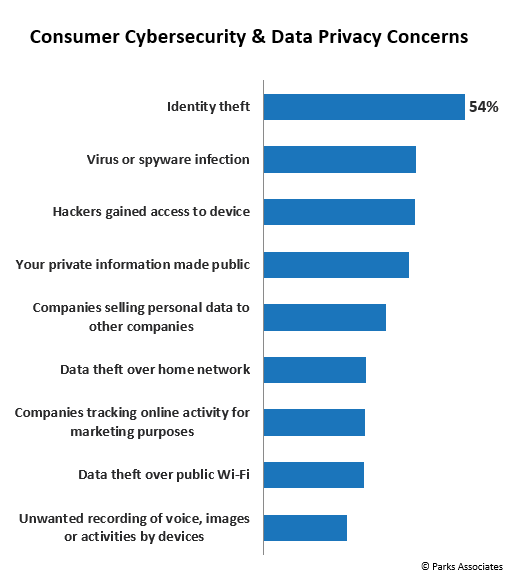
People worry about many things when using smart home devices. Here are some common privacy concerns:
- Data Collection: Devices collect personal information like voice, location, and habits.
- Data Sharing: Some companies share your information with others without asking.
- Hacking: Hackers might break into your devices and see your data or control your home.
- Always Listening: Some devices listen all the time and can record private talks.
- Weak Passwords: Easy passwords make it simple for bad people to access your devices.
- Updates: If devices do not get regular updates, they become unsafe.
Why Is Privacy Important?
Privacy means keeping your personal information safe. It stops others from using your data without permission. If someone gets your data, they can do bad things like:
- Steal your money.
- Spy on your home.
- Use your information to trick you.
- Cause harm to your family.
So, protecting privacy is very important when using smart home devices.
How Do Smart Home Devices Collect Data?
Smart devices collect data in many ways. Here are some examples:
| Device | Data Collected | Purpose |
|---|---|---|
| Smart Speakers | Voice commands and sounds | To respond to your requests |
| Smart Cameras | Video and images | To monitor your home |
| Smart Thermostats | Temperature preferences and schedules | To keep your home comfortable |
| Smart Locks | Entry and exit times | To control who enters your home |
While this data helps devices work better, it can also be risky if not protected.
Simple Steps to Protect Your Smart Home Data
You can take easy steps to keep your smart home data safe. Here are some tips:
1. Use Strong Passwords
Passwords protect your devices. Use long passwords with letters, numbers, and symbols. Avoid simple words like “password” or “1234.” Change passwords regularly. Never share your passwords with others.
2. Keep Devices Updated
Manufacturers release updates to fix security problems. Always install updates when they are available. This makes your devices safer from hackers.
3. Be Careful With Voice Assistants
Voice assistants listen for commands. Turn off the microphone when not in use. Check the settings to control what data is saved. Delete voice recordings regularly if possible.
4. Limit Data Sharing
Read privacy policies before using devices. Some companies share data with others. Turn off features that share data if you can. Only give permission for data sharing when needed.
5. Use Secure Wi-fi
Your home Wi-Fi should be secure. Use a strong password for your Wi-Fi network. Avoid using public Wi-Fi for smart devices. Set up a separate network for smart devices if possible.
6. Turn Off Devices When Not Needed
If you don’t use a device often, turn it off. This stops it from collecting or sending data. It also saves energy.
7. Set Up Two-factor Authentication
Two-factor authentication adds a second step to log in. It makes it harder for hackers to access your accounts. Use it if your device or service offers it.
8. Check Device Permissions
Some devices ask permission to access your contacts, location, or camera. Only allow permissions needed for the device to work. You can change permissions in device settings.
What to Do If You Suspect a Privacy Problem?
If you think someone has hacked your device, act fast. Here is what to do:
- Change your passwords immediately.
- Disconnect the device from the internet.
- Check for software updates and install them.
- Contact the device maker for help.
- Monitor your accounts for unusual activity.
Taking quick action can stop further problems.
Credit: www.parksassociates.com

Credit: www.sciencedirect.com
Choosing Safe Smart Devices
Not all smart devices are the same. Some have better security than others. When buying a smart device, think about these points:
- Does the company provide regular security updates?
- Is the device easy to set up with strong passwords?
- Can you control how your data is used?
- Does the device have good reviews about security?
Choosing the right device helps protect your privacy.
Frequently Asked Questions
What Are Common Privacy Risks With Smart Home Devices?
Smart home devices can collect personal data, which may be hacked or shared without permission. Weak passwords and unsecured networks increase these risks.
How Can I Secure My Smart Home Network Easily?
Use a strong, unique Wi-Fi password and enable network encryption. Regularly update your router’s firmware for better security.
Why Should I Update Smart Device Software Regularly?
Updates fix security bugs and protect against new threats. Keeping software current helps keep your data safe.
Can Smart Devices Listen To Private Conversations?
Some devices have microphones that might activate by mistake. Always check privacy settings and mute devices when not in use.
Conclusion
Smart homes bring convenience and comfort. But they also bring privacy risks. Knowing these risks helps you protect yourself. Use strong passwords, keep devices updated, and control data sharing. Secure your Wi-Fi and use two-factor authentication. Always watch your devices and take action if needed.
With care and attention, you can enjoy your smart home safely. Protect your data and keep your family secure.