

What if your “smart” home is actually making your life more complicated? You’ve likely felt that spike of frustration when a brand-new light strip refuses to connect, or when you realize you now need five different apps just to dim the kitchen lights and lock the front door. It’s a common headache in 2026, where over 51% of U.S. households are navigating a sea of competing protocols and “universal” promises that don’t always deliver on the first try.
We agree that technology should serve you, not the other way around. You deserve a home that feels intuitive and cohesive rather than a collection of expensive, isolated gadgets. This smart home hub compatibility guide is designed to demystify the technical jargon and help you master the complex world of connectivity. We’ll show you how to ensure every future purchase talks perfectly to your hub so you can finally enjoy a single-app lifestyle with total peace of mind.
We are diving into the latest Matter 1.6 updates, comparing how the major ecosystems handle local control, and giving you the tools to build a savvy nest that stays functional for years. This guide moves from the basics of ecosystem selection to practical tips for ensuring your devices remain compatible as the industry evolves.
Key Takeaways
- Understand why having ten apps is the opposite of a smart home and learn the vital difference between simple compatibility and true interoperability.
- Discover how to layer your connectivity using WiFi for basics and mesh networks like Thread for a more reliable, congestion-free experience.
- Use this smart home hub compatibility guide to pick between the “Big Three” ecosystems so every device you buy syncs perfectly with your preferred interface.
- Future-proof your setup by mastering the Matter 1.6 standard, the universal language that finally lets different brands work together seamlessly.
- Adopt a “buy once, work forever” mindset with our 5-point verification checklist and learn to use the CSA database to vet products before you buy.
Why Won’t My Devices Talk? Understanding the Compatibility Gap
If you feel like your smartphone has become a digital junk drawer of single-purpose apps, you aren’t alone. Having ten different apps to control ten different lights is the exact opposite of a smart home; it’s a digital chore. This friction usually happens because of a gap in how your devices communicate. When gadgets can’t talk to each other, you lose the ability to create the seamless, automated routines that make technology actually feel helpful. This smart home hub compatibility guide is your roadmap to ending that “app fatigue” for good.
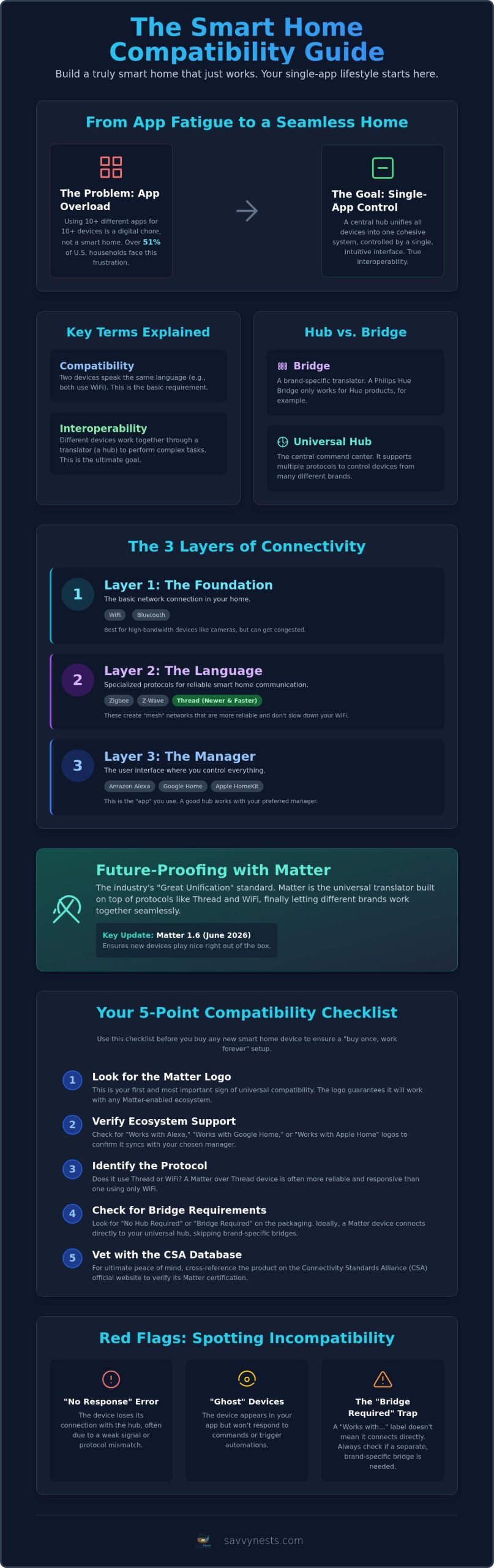
To fix the problem, you first need to understand the difference between compatibility and interoperability. Compatibility means two devices speak the same language, like WiFi or Zigbee. Interoperability is the higher goal; it’s when those devices work together through a translator to perform a task. These home automation systems rely on a shared understanding to ensure your motion sensor can tell your lights to turn on, even if they are made by different companies. Without a central “brain” to handle these translations, your devices remain isolated islands.
We’ve officially entered the “Year of the Great Unification.” With the release of Matter 1.6 in June 2026, the industry has shifted toward a baseline standard where devices are finally expected to play nice right out of the box. Your hub acts as the savvy interpreter in this setup. It sits at the center of your home, taking the various “languages” from your locks, cameras, and thermostats and turning them into a single, cohesive system you can control with one tap.
The Difference Between a Hub and a Bridge
It is easy to confuse a brand-specific bridge with a universal hub. A bridge, like the Philips Hue Bridge, acts as a dedicated translator for one specific brand’s products. It helps those specific bulbs talk to your network, but it won’t help you control a Yale lock or an Ecobee thermostat. In contrast, a universal smart home hub supports multiple protocols at once. A Smart Home Hub is the central command center for all automation. If your devices already support the latest Matter over Thread standards, you can often skip the brand-specific bridge entirely and connect them directly to your central hub.
Common Signs of Incompatibility
The dreaded “No Response” error is often the first red flag that your ecosystem is struggling. This usually happens when a device loses its handshake with the hub or uses a protocol that your network can’t quite reach. You might also notice “ghost” devices; these show up in your app but refuse to trigger automations or respond to voice commands. Another common trap is buying a device labeled “Works with Alexa” that still requires its own separate hub to function. This smart home hub compatibility guide helps you spot these requirements on the packaging before you ever leave the store, saving you a trip back for a return.
The Three Layers of Connectivity: WiFi, Protocols, and Ecosystems
Building a reliable smart home is a lot like building a house; you need a solid foundation before you start picking out the curtains. In this smart home hub compatibility guide, we break down connectivity into three distinct layers. Understanding how these layers interact is the secret to avoiding a home that feels “glitchy” or slow. When your devices are organized correctly, they work together in the background without you ever having to think about the underlying tech.
Layer 1 is the Foundation, consisting of WiFi and Bluetooth. These are the most common entry points because almost every home already has a router. While WiFi is great for high-bandwidth devices like cameras, it’s prone to congestion. Layer 2 is the Language, which includes specialized protocols like Zigbee, Z-Wave, and the newer Thread. These create “mesh” networks that don’t bog down your main internet connection. The Matter protocol sits on top of these, acting as a universal translator that ensures different brands can finally understand each other. Finally, Layer 3 is the Manager. This is the user interface you interact with, such as Alexa, Google Home, or Apple HomeKit. A universal hub bridges all three layers, allowing a Zigbee motion sensor to trigger a WiFi light bulb through your Apple Home app without any friction.
Understanding Mesh Networks: Zigbee vs. Z-Wave
Mesh networks are unique because they actually get stronger the more devices you add to your home. Unlike WiFi, where every device competes for the router’s attention, mesh devices pass signals to one another. This extends your range and increases reliability. By 2026, Zigbee has become the savvy choice for most consumers because of its massive device library and cost-efficiency. It’s the protocol found in everything from budget-friendly sensors to high-end lighting. For a deeper dive, see our Zigbee vs Z-Wave vs WiFi Smart Home guide to see which fits your specific needs.
Why WiFi Isn’t Always the Best Choice
It’s tempting to buy “hubless” WiFi bulbs because they are cheap and easy to set up. However, there’s a hidden cost to this convenience. Every WiFi device you add puts a small amount of strain on your router. If you have 30 or 40 smart bulbs all fighting for a WiFi connection, your phone’s internet speed might start to suffer. WiFi also drains batteries much faster than efficient protocols like Thread. We recommend using WiFi for devices that need to send a lot of data, such as video doorbells. For everything else, sticking to a dedicated protocol is the best way to keep your home running smoothly. You can find more specific recommendations in our latest smart home buying guides.
Ecosystem Deep Dive: Alexa, Google Home, and Apple HomeKit
Choosing an ecosystem is the most critical decision in your automation journey. It’s the “home base” where your devices gather to follow your orders. While previous chapters of this smart home hub compatibility guide focused on the technical languages devices speak, this section looks at the managers who give those devices their purpose. Amazon, Google, and Apple each offer a different philosophy on how a smart home should feel, and your choice here will determine which light switches, locks, and cameras you can actually use.
Open ecosystems like Amazon Alexa and Google Home prioritize broad compatibility, giving you the freedom to mix and match hardware from thousands of manufacturers. In contrast, closed or “curated” ecosystems like Apple HomeKit focus on a tighter, more secure experience. When shopping, you’ll see “Works With” badges on every box. These are essentially promises from the manufacturer that the device has passed basic testing. However, for the most reliable experience in 2026, look for the Matter logo, which is overseen by the Connectivity Standards Alliance. This badge guarantees that the device will work across all major platforms without needing a proprietary bridge.
Amazon Alexa and Google Home: The Crowd Favorites
Amazon Alexa currently supports over 100,000 different devices, making it the most flexible choice for those who love variety. It’s the go-to option if you want to find the most affordable sensors or niche gadgets. Google Home, supporting roughly 50,000 devices, shines when it comes to AI-driven routines. Its ability to understand natural language and integrate with your search history makes it feel like a proactive assistant rather than just a remote control.
One savvy tip for these users is to pair your voice assistant with a dedicated hardware hub. While software apps are great, a physical hub ensures your automations happen locally and instantly, even if your internet goes down. You can compare the top hardware options in our Best Smart Home Hub for Alexa and Google guide.
Apple HomeKit: The Secure and Private Choice
Apple takes a different approach by enforcing strict security and privacy requirements. This means HomeKit-certified devices often come with a higher price tag, but they offer a level of reliability and data protection that open systems sometimes lack. Because HomeKit processes most commands locally on your home network, your data doesn’t have to travel to the cloud every time you turn on a light. This reduces the risk of hackers accessing your home through a weak device link.
This focus on privacy makes it a favorite for those who want a secure, high-end nest. If you are committed to the Apple ecosystem, check out our curated list of the best smart home hub for Apple HomeKit to find a controller that matches Apple’s high standards for quality and encryption.
Future-Proofing with Matter and Thread: The 2026 Standard
By now, you understand that a smart home hub compatibility guide is only as good as the standards it supports. In 2026, those standards are Matter and Thread. Matter is the universal language that finally allows Apple, Google, and Amazon devices to sit at the same table and talk. It removes the wall between ecosystems, meaning you no longer have to check for a specific “Works with” logo before you buy. If it has the Matter badge, it will work with your chosen hub.
Many users get confused between Matter and Thread, but the distinction is simple. Matter is a software standard, while Thread is a hardware communication protocol. Think of Matter as the words being spoken and Thread as the high-speed wire that carries them. Thread is a low-power mesh network that doesn’t rely on your WiFi, making it faster and more reliable for battery-operated devices like door locks and motion sensors. For a hub to be a worthwhile investment in 2026, it must support both of these technologies to ensure your home stays relevant as new gadgets hit the market.
The Benefits of a Matter-Ready Home
One of the biggest wins for the savvy homeowner is local control. In the past, many devices relied on the cloud to process commands. If your internet went out, your “smart” lights became dumb. With Matter, your hub processes commands locally on your home network. This results in near-instant response times and better privacy. Another major benefit is the Multi-Admin feature. This allows you to control the same smart light from an iPhone in the kitchen and an Android tablet in the bedroom simultaneously. It ends the “ecosystem lock-in” that used to force families to use only one type of phone or tablet.
Is Your Current Gear Obsolete?
You don’t need to throw away your favorite Zigbee or Z-Wave sensors just yet. While Matter is the future, we are currently living in the era of the “Hybrid Nest.” Many manufacturers have released software updates for older hubs to make them Matter-compatible. For devices that can’t be updated, you can use a “Matter Bridge.” These small devices act as a translator, taking your older legacy gear and making it appear as a Matter device to your modern hub. This strategy allows you to protect your previous investments while slowly transitioning to newer Thread-based hardware. To find the right balance of new tech and legacy support, explore our latest smart home buying guides for expert hardware recommendations.
Creating Your Savvy Setup: How to Verify Compatibility Before You Buy
You have learned the languages, the protocols, and the ecosystems. Now comes the most exciting part: actually building your nest. Walking down the tech aisle or scrolling through online listings can still feel overwhelming, but this smart home hub compatibility guide gives you the tools to shop with total confidence. The goal is to move past the marketing hype and look at the technical DNA of a device before you ever hit the “buy” button. When you prioritize how a device connects over how much it costs, you ensure your home stays fast, responsive, and private.
Before making a purchase, it’s a savvy move to consult the Connectivity Standards Alliance (CSA) database. This is the official registry for every Matter-certified device in the world. Manufacturers might claim a product is “Matter-ready,” but the CSA database confirms it has actually passed the rigorous testing required for true interoperability. Checking this source takes less than a minute and can save you hours of troubleshooting a device that doesn’t actually play well with others. By verifying the certification first, you protect your home from technology that might become obsolete in a year.
The Savvy Buyer’s 5-Step Checklist
Use these five checks for every new gadget you consider adding to your system. This process ensures that your home foundation remains solid and your “app fatigue” never returns.
- Check 1: Ecosystem Match. Does the box explicitly state it works with your primary interface, such as Alexa, Google Home, or Apple HomeKit?
- Check 2: Protocol Type. Does it use WiFi, Zigbee, or Thread? Remember that Thread is the gold standard for speed and battery life in 2026.
- Check 3: Bridge Requirements. Does it need a proprietary brand bridge to function, or can it connect directly to your universal hub?
- Check 4: Matter Certification. Look for the Matter logo. This is your insurance policy for future-proofing and cross-platform control.
- Check 5: Local Control. Verify if the device can process commands without the cloud. This ensures your lights still work if your internet connection drops.
Managing Your Expectations (and Your Budget)
It’s okay to “cheat” on your primary ecosystem occasionally if a specific device offers a feature you can’t find elsewhere. Because you have a universal hub, that one-off gadget can still participate in your main automations. However, don’t let a low price tag trick you into buying a “hubless” WiFi sensor. While it might be $5 cheaper upfront, the strain it puts on your router and the lag in response time often isn’t worth the savings. A dedicated hub actually pays for itself over time. It allows you to buy more affordable, battery-efficient Zigbee or Thread sensors that would otherwise require expensive WiFi hardware to function. Ready to pick your brain? Start with The Ultimate Smart Home Buying Guide to find the perfect foundation for your home.
Your Journey to a Truly Savvy Nest Starts Now
You now have the blueprint to stop buying gadgets that don’t talk to each other. By prioritizing Matter 1.6 and Thread standards, you are choosing a home that works locally and stays fast even when the internet goes down. You’ve learned how to bypass app fatigue by selecting a universal hub that acts as your savvy interpreter. This smart home hub compatibility guide is the first step toward a home that finally feels intuitive and unified.
We’ve done the heavy lifting with real-world testing in our own ‘Savvy Nest’ to ensure our 2026-ready tech recommendations are reliable and secure. Our expert-curated compatibility lists help you skip the frustration of trial and error. Build your perfect nest with our 2026 Smart Home Buying Guide and take control of your environment today. You have the knowledge to make smart, sustainable choices. It’s time to experience the peace of mind that comes with a home that simply works.
Frequently Asked Questions
Do I really need a smart home hub if I have a smart speaker?
You need a dedicated hub if you want to use devices that don’t rely on WiFi, such as Zigbee sensors or Thread-enabled locks. While many smart speakers act as basic controllers, a hub provides the local processing power needed for complex automations and faster response times. It ensures your home stays smart even when your cloud connection is unstable or your internet service fluctuates.
Will Matter make my Zigbee and Z-Wave devices stop working?
Your existing Zigbee and Z-Wave devices will continue to work perfectly alongside newer technology. Matter is a software standard designed to coexist with older protocols rather than replace them. By using a Matter-compatible bridge, your legacy gear can actually appear as modern Matter devices within your app. This allows you to extend the life of your current hardware well into the future.
Can I use an Alexa-compatible bulb with a Google Home hub?
You can use an Alexa-compatible bulb with Google Home if the device is Matter-certified or if your hub supports the bulb’s specific protocol. In 2026, the lines between ecosystems have blurred significantly. This smart home hub compatibility guide recommends looking for the Matter logo to guarantee that a bulb works across every major platform without any extra setup or proprietary bridges.
What happens to my smart home compatibility if the internet goes out?
Your automations and device connections will remain functional if your hub supports local control via Matter or protocols like Zigbee. Unlike cloud-dependent systems, a local hub processes commands within your house. You will still be able to trigger lights with motion sensors or use your wall switches. You only lose remote access through your phone while the internet connection is actually down.
How many devices can one smart home hub handle before it gets slow?
Most modern hubs can comfortably manage between 50 and 200 devices without any noticeable lag in performance. If you use a mesh protocol like Thread or Zigbee, your network actually becomes more stable as you add more powered devices like smart plugs. Performance only typically dips if you have too many high-bandwidth WiFi devices competing for your router’s attention at the same time.
Is Apple HomeKit compatible with Matter devices in 2026?
Apple HomeKit is fully compatible with all Matter-certified devices as of 2026. This integration allows you to add non-HomeKit branded gadgets into your Apple Home app seamlessly. It is a huge win for privacy-focused users who want more hardware variety. You can now enjoy a wider range of products while maintaining Apple’s strict security standards for your daily living environment.
Do all Matter-certified devices work with every Matter hub?
Every Matter-certified device is designed to work with any Matter-certified hub, regardless of the manufacturer. This smart home hub compatibility guide highlights this as the most significant shift in home technology. While specific advanced features might vary between different apps, the basic functions like turning a light on or locking a door are guaranteed to work across all certified platforms.
What is the best smart home protocol for a large house with thick walls?
Z-Wave is often the best choice for large homes with thick walls because it operates on a lower radio frequency that penetrates solid objects effectively. Thread is also an excellent alternative because its mesh networking capabilities allow signals to hop from one device to another. This creates a reliable path around obstacles that would typically block a standard WiFi signal from reaching the far corners of your home.

Article by
Michael J. Mahon
Smart home automation transforms ordinary homes into intelligent living spaces by connecting devices that improve convenience, security, energy efficiency, and comfort. SavvyNests makes smart home technology easy to understand with expert guides, reviews, and recommendations for every budget.