
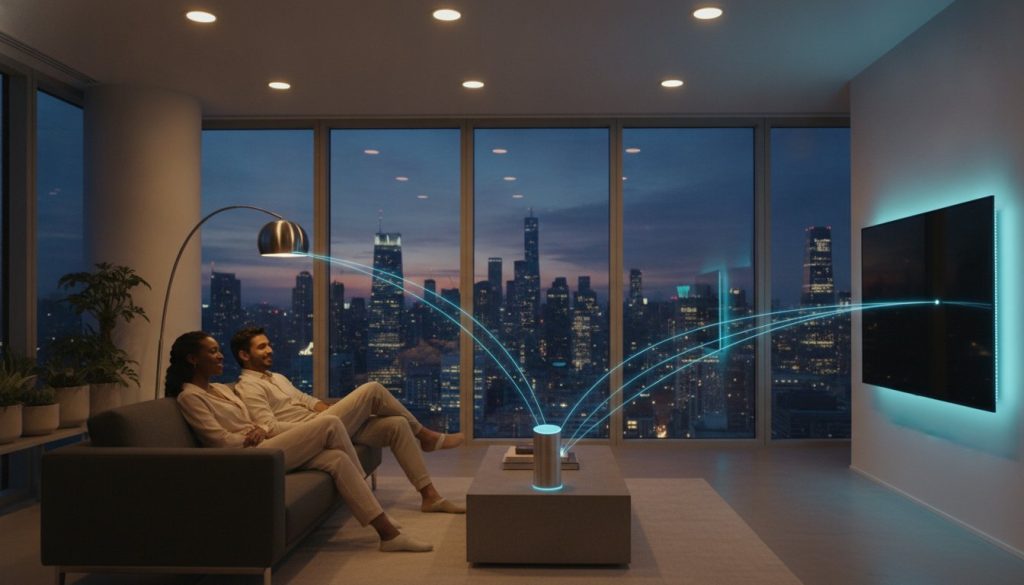
The most expensive smart bulb on the market is worthless if it shows up as “Offline” the moment you actually need it. We’ve all been there, standing in the dark and waiting for a command to register while the app spins. It’s frustrating when technology that’s supposed to simplify your life ends up adding to your daily stress. You deserve a home that responds instantly, every single time.
This guide helps you identify the best smart lights that work with google home automation so you can build a reliable “Savvy Nest” without the technical overwhelm. We’ve curated the top Matter-compatible picks for 2026, focusing on devices that offer stable local connections and seamless integration with Google’s Gemini assistant. We’ll explore everything from high-performance ceiling lights to budget-friendly bulbs that slash your energy bills through smart scheduling. By the end of this guide, you’ll know exactly which lights will stay connected and how to set up routines that make your home feel truly intuitive.
Key Takeaways
- Understand why Matter-certified lighting is the essential standard for 2026 to eliminate “offline” device errors and ensure instant response times.
- Discover how to choose the best smart lights that work with google home automation by prioritizing Thread-native connectivity over standard Wi-Fi.
- Compare top-tier performers like Philips Hue and Nanoleaf to find the perfect balance between high-end features and budget-friendly speed.
- Master the step-by-step process for building advanced Google Home routines that trigger automatically based on your daily habits and sensors.
- Learn a simple three-step troubleshooting method to fix unresponsive bulbs and keep your smart home network running at peak performance.
Why Your Google Home Automation Needs Matter-Certified Lighting in 2026
By 2026, the way we think about home automation has shifted. We’ve moved away from the clunky, cloud-dependent setups of the early 2020s toward a more resilient, local-first approach. Matter is the universal language that allows different brands to talk to Google Home locally, ensuring your devices communicate without needing to ping a server halfway across the world first. When you look for the best smart lights that work with google home automation, the “Matter-certified” badge is your guarantee of a friction-free experience. This standard ensures that your hardware stays responsive even if your internet connection happens to flicker.
To better understand how these new standards simplify your setup, watch this helpful video:
The Death of the “Offline” Device
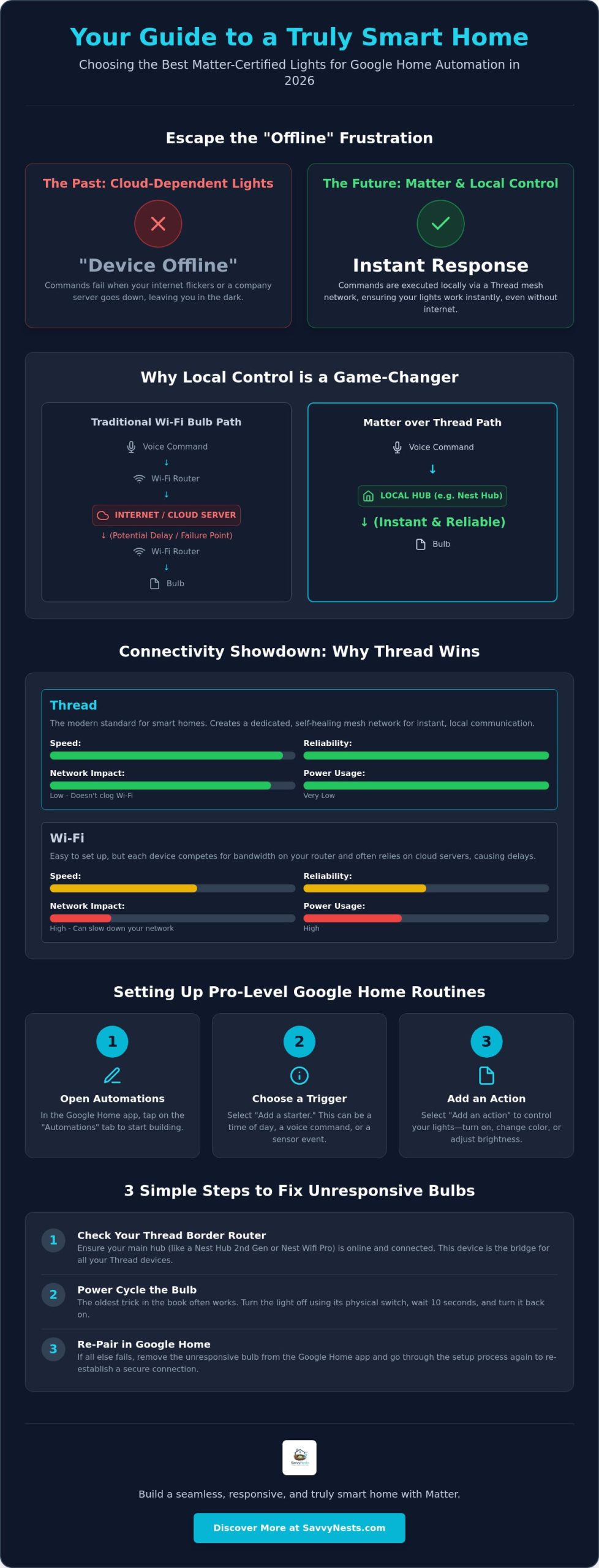
Nothing ruins the mood faster than a “device offline” notification when you’re trying to set the scene for a movie night. Most older smart bulbs rely on Wi-Fi, which connects directly to your router and often depends on a manufacturer’s cloud server to function. If your internet stutters or the manufacturer’s server goes down, your lights become “dumb” bulbs again. Thread changes this by creating a mesh network where every bulb acts as a signal booster, strengthening your lighting control systems with every device you add. Because Matter over Thread executes commands locally, your lights turn on instantly. There’s no more awkward three-second lag between your voice command and the actual action.
Future-Proofing Your Savvy Nest
Choosing Matter-certified lighting isn’t just about speed; it’s about making sure your home stays functional for years to come. In 2026, many manufacturers are phasing out proprietary Wi-Fi bulbs in favor of this open standard. Buying legacy Wi-Fi bulbs now is a dead-end investment because they won’t play as nicely with the latest Google Home features, like the advanced Gemini-powered routines. These lights also integrate perfectly with other parts of your ecosystem, such as our best matter smart plugs, creating a unified network where every device supports the others. Always check for the Matter logo on the box to ensure you’re getting the best smart lights that work with google home automation today and tomorrow. This simple check saves you from the headache of replacing outdated tech just a year or two down the line.
Key Criteria for Google-Compatible Lights: Beyond the “Works with Google” Label
Choosing the best smart lights that work with google home automation requires looking past the colorful box. While many products claim compatibility, the actual performance varies wildly based on how they connect and the quality of light they produce. According to a recent analysis of Matter-enabled lights, the industry is moving toward standards that prioritize local speed over cloud dependence. If you want a setup that feels like a natural part of your home rather than a science project, you need to evaluate three specific areas: connectivity, light quality, and physical control.
Connectivity: Why Thread Wins for Automation
In the past, you chose between Wi-Fi and Bluetooth. Wi-Fi bulbs are easy to set up but can clog your router, while Bluetooth suffers from high latency and short range. Thread is the modern solution. It’s a low-power mesh network that doesn’t rely on your internet to function. If you own a Google Nest Hub (2nd Gen) or a Nest Wi-Fi Pro, you already have a Thread Border Router. These devices act as a bridge, allowing your Thread-enabled lights to communicate instantly with Google Home. This setup reduces battery drain on sensors and ensures your automations trigger without that annoying “thinking” pause. Checking a smart home ecosystem comparison can help you confirm if sticking with Google’s hardware is the right long-term move for your property.
Beyond connectivity, pay attention to the Color Rendering Index (CRI). High-quality bulbs have a CRI of 90 or higher, which means colors in your room look vibrant and natural. Cheap bulbs often make spaces feel sterile or “off.” Similarly, look for a wide dimming range. The best smart lights that work with google home automation can drop to 1% brightness. This is essential for “Night Owl” routines where you want just enough light to see the hallway without fully waking up your brain. It makes the transition from sleep to wakefulness much gentler on your eyes.
The “Wife/Husband/Guest” Factor
The biggest hurdle in any smart home is the traditional wall switch. If a guest flips the switch off, your smart bulb loses power and your expensive automation dies. To solve this, savvy users pair their bulbs with smart buttons or dimmers that mount over the existing switch. This keeps the circuit “always on” while giving everyone a familiar physical way to control the room. It’s about making technology serve the people in the house, not forcing them to learn a new way to turn on a lamp. If you’re just starting, our smart home buying guides offer a great roadmap for choosing these essential accessories to keep your ecosystem running smoothly.
The Best Smart Lights for Every Room: Our Top 2026 Savvy Picks
Finding the best smart lights that work with google home automation involves more than just picking a bright bulb. You need a device that matches the specific needs of your space while maintaining a rock-solid connection to your Google ecosystem. Whether you’re illuminating a home office or setting the mood in a living room, these 2026 picks represent the gold standard in reliability and ease of use. Each recommendation has been chosen because it prioritizes Matter-Certified Lighting standards, ensuring your home remains fast and responsive.
Best Overall: Philips Hue White & Color Ambiance
Philips Hue remains the champion of the smart lighting world for good reason. While the industry has moved toward hub-free setups, the Philips Hue Bridge is still a savvy choice for large-scale homes because it offloads the processing power from your router. This setup allows for “Adaptive Lighting,” a feature that automatically mimics natural sunlight by shifting from cool whites in the morning to warm, amber tones in the evening. Beyond the features, the build quality is unmatched. These bulbs boast a 25,000-hour lifespan, which means you won’t have to think about replacing them for roughly 20 years. It’s a premium investment that pays off through sheer longevity and a “set it and forget it” user experience.
Best Value: Nanoleaf Essentials Matter over Thread
If you’re just starting your journey and want the best smart lights that work with google home automation without a high price tag, Nanoleaf Essentials is the answer. These bulbs are Thread-native, meaning they don’t require a proprietary bridge if you already own a compatible Google Nest device. They are incredibly fast, responding to voice commands almost the instant you finish speaking. We love the “Circadian Lighting” feature, which syncs the bulb’s color temperature to your local timezone’s daylight cycle. It’s a simple way to improve your well-being and productivity without manual adjustments.
Best for Renters: Govee and WiZ Options
Renters often face the challenge of wanting a high-tech home without making permanent changes. Govee and WiZ offer fantastic portable solutions like floor lamps and LED strip lights that require zero drilling. Govee’s Matter-enabled strip lights are particularly impressive for entertainment zones, as they sync with your music and movies to create an immersive atmosphere. When installing these, always use high-quality adhesive strips to ensure they stay secure without peeling the paint when you move. For more ideas on building a non-permanent setup, check out our guide on smart home devices for renters. These options prove you don’t need to own your home to enjoy a fully automated, savvy lifestyle.
Step-by-Step: Setting Up Your First Pro-Level Google Home Lighting Routine
Voice control is a fantastic convenience, but the real magic of a smart home happens when you don’t have to say a word. True automation means your house anticipates your needs based on the time of day, your location, or even the movement in a room. To begin, open the Google Home app and tap the “Automations” tab at the bottom of the screen. This is the command center where you’ll coordinate the best smart lights that work with google home automation to create a truly intuitive living space. Tap the plus (+) icon to start building a new routine from scratch.
Every professional-level routine follows a simple “If This, Then That” logic. First, you’ll select a “Starter.” This could be a specific time, like sunset, or a device trigger, such as a motion sensor. Next, you’ll add “Actions.” When selecting your lights, don’t just turn them on; specify the exact brightness and color temperature you want. You can even set a transition time, allowing the lights to fade in gently rather than snapping on instantly. This small detail makes your home feel much more sophisticated and polished.
The “Good Morning” Routine
Start your day without the jarring shock of a loud alarm or bright overhead lights. You can program a routine that begins 15 minutes before you wake up, gradually increasing the brightness of your bedroom bulbs from 1% to 100%. This mimics a natural sunrise and helps regulate your internal clock. To make the morning even smoother, add actions that prompt Google to announce the day’s weather and your first calendar appointment once the lights reach full brightness. If you’re ready to explore more complex triggers, our guide on how to create smart home routines provides a deep dive into advanced logic.
The “Away from Home” Security Routine
Automation is one of the most effective ways to protect your property. By using “Presence Sensing,” Google Home can detect when the last person has left the house based on phone location and automatically turn off every light to save energy. For even better protection, set a “Vacation” routine that toggles your lights in random patterns during the evening. This mimics occupancy and discourages intruders, making it a vital part of modern diy home security systems. To find more ways to optimize your environment, check out our latest home automation tips and hacks to keep your nest running efficiently.
Maintaining Your Savvy Nest: Troubleshooting and Future-Proofing
Even the best smart lights that work with google home automation can occasionally hit a snag. Technology isn’t perfect, but most issues in 2026 are easily solvable with a systematic approach rather than a frustrated “unplug everything” tactic. Maintaining your system ensures that your automations remain snappy and your home stays responsive. By staying proactive with updates and understanding your network health, you can prevent most “Not Responding” errors before they even occur.
Common Connectivity Fixes
When a light stops responding, don’t panic. Start with a simple three-step reset. First, verify the physical wall switch is actually on. It sounds simple, but it’s the most common culprit. Second, perform a power cycle by turning that physical switch off for ten seconds and then back on. This forced reboot often clears minor communication glitches. Third, check the Google Home app to see if the device needs a simple re-sync. If these steps fail, you might need a factory reset, which wipes the device settings entirely. This should be your last resort since it requires re-adding the bulb to your routines. For a deeper dive into specific error codes, our smart home troubleshooting guide offers a comprehensive roadmap for fixing any stubborn device.
You can also check your Thread network status directly within the Google Home app settings. Since Thread creates a mesh, one offline bulb can sometimes weaken the signal for others nearby. If you notice a specific room consistently lagging, it might be time to move your Thread Border Router or add another plug-in Matter device to bridge the gap.
Scaling Your System
As you grow your collection of the best smart lights that work with google home automation, keep an eye on your Wi-Fi bandwidth. Traditional Wi-Fi bulbs can quickly congest a standard router once you move past 20 or 30 devices. This is where Thread shines. Because Thread bulbs communicate with each other rather than fighting for a direct spot on your router, a Google Home setup can theoretically handle hundreds of lights without slowing down your Netflix stream. If your home is large or has thick walls, adding a second Nest Hub or a Nest Wi-Fi Pro acts as an additional Border Router, creating a “self-healing” network that covers every corner of your property.
Always prioritize firmware updates for your Matter devices. These updates often include critical security patches and performance improvements that make brand-mixing even more stable. The savvy approach is to start small. Master one room, perfect your routines, and then expand. This methodical growth prevents the “technical overwhelm” and ensures your smart home remains a source of comfort rather than a chore.
Transform Your Home with Intuitive Lighting
Building a modern smart home doesn’t have to be a technical headache. By prioritizing Matter-certified devices and utilizing Thread connectivity, you’ve already solved the most common connectivity frustrations. You’ve learned how to choose the right hardware for every room and how to turn simple bulbs into life-enhancing routines that work for you. Whether it’s a gentle sunrise fade-in or a vacation security routine, your home is now equipped to serve your daily life with zero lag.
Selecting the best smart lights that work with google home automation is the essential first step toward a home that truly understands your needs. We’ve tested these recommendations for seamless integration to ensure you get the reliable performance you deserve. If you’re ready to expand your ecosystem further, we’re here to help you navigate every choice with confidence and ease.
Ready to take the next step? Build your Savvy Nest with our top-rated smart home buying guide. Our guide features 2026 Matter-standard compliant recommendations and easy DIY setup instructions to keep your upgrades stress-free. You have the tools to create a space that offers convenience, security, and peace of mind. Start with one room today and watch how quickly your home transforms into an intuitive, responsive sanctuary.
Frequently Asked Questions
Do all smart lights work with Google Home?
No, not all smart lights are compatible with the Google Home ecosystem. To ensure a device will connect, look for the “Works with Google Home” badge or the Matter logo on the packaging. While many generic Wi-Fi bulbs might claim compatibility, choosing certified hardware ensures you can use voice commands and include the bulbs in your automated routines without frustrating connectivity issues.
Do I need a hub for smart lights to work with Google Home?
You don’t always need a separate hub, as many modern bulbs connect directly via Wi-Fi or Matter over Thread. However, some systems like Philips Hue still use a dedicated bridge to manage large numbers of lights more efficiently. If you have a Google Nest Hub (2nd Gen) or Nest Wi-Fi Pro, these devices often act as the necessary controller for Matter-enabled lights, removing the need for extra hardware.
What is the difference between “Works with Google Home” and Matter?
“Works with Google Home” is a legacy certification that indicates a device can be controlled by Google’s cloud servers. Matter is the newer, universal standard that allows devices to communicate locally and across different platforms like Apple and Alexa. Choosing Matter-certified options provides faster response times and better reliability because your lights don’t have to rely on an active internet connection to process every command.
Can I control my Google Home lights when I am away from home?
Yes, you can control your lights from anywhere in the world using the Google Home app on your smartphone. As long as your home internet is active and your bulbs are connected to your network, you can toggle them manually or adjust your schedules. This feature is a great way to improve your home security by making it look like someone is home while you’re traveling.
How many smart bulbs can I connect to one Google Nest router?
A standard Google Nest router can typically handle about 30 to 50 Wi-Fi devices before you start noticing a dip in performance. If you choose the best smart lights that work with google home automation that use Thread networking, you can connect hundreds of bulbs. Because Thread devices create their own mesh network, they don’t fight for bandwidth on your router, keeping your internet fast for other activities.
Why do my smart lights keep disconnecting from Google Home?
Frequent disconnections are usually caused by Wi-Fi signal interference or a weak connection between the bulb and your router. If your router is tucked away in a cabinet or behind a TV, the signal might struggle to reach every room. You can often fix this by updating your device firmware in the manufacturer’s app or by switching to Thread-based bulbs that strengthen the signal with every added light.
Can I use smart bulbs in a lamp with a dimmer switch?
You should never use smart bulbs in a fixture controlled by a traditional physical dimmer switch. Smart bulbs have their own internal dimming electronics, and the fluctuating power from a wall dimmer can cause flickering or permanent damage to the bulb’s circuitry. For the best experience, keep your wall switch at 100% power and use the Google Home app or voice commands to adjust the brightness levels.
What are the best cheap smart lights for Google Home in 2026?
Nanoleaf Essentials and WiZ remain the top budget-friendly choices in 2026. Nanoleaf is particularly impressive because it offers Matter over Thread support at a lower price point than premium competitors. These brands allow you to find the best smart lights that work with google home automation without overspending, giving you a reliable and fast setup for a very accessible price per bulb.
Article by
Michael J. Mahon
Smart home automation transforms ordinary homes into intelligent living spaces by connecting devices that improve convenience, security, energy efficiency, and comfort. SavvyNests makes smart home technology easy to understand with expert guides, reviews, and recommendations for every budget.